Reading Values Post Facto
Use the STAT data suffix for tag I/O addressing to configure a timestamp offset.
Hold is not supported with the STAT suffix. If your driver has Hold enabled and you are using the STAT suffix, in the event of a comms loss the value will not Hold. A gap will appear in your trend just like it would with hold in it's default disabled state.
Why would you want to read values after the fact?
Consider the following scenario:
A PLC monitors daily flow metrics.
Two registers are used. The first accumulates a value over the course of a day. Near the end of the day, the final value is written to the second register and the first resets.
The value in register #2 represents the daily flow total for the preceding day.
VTScada reads the new value and it is recorded with a timestamp from the time it was read.
In a report or on a chart, this is easily misinterpreted and difficult to relate to other metrics over the same time period.
It appears as though the daily flow totals are offset by a day.
To align your metrics, configure your read address using STAT. Values read will snap to the nearest configured time unit and shift the timestamp back by a specified multiple.
Formatting the STAT address suffix
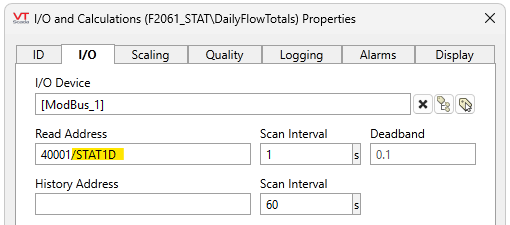
The suffix is configured on the end of the Read address like so:
The address suffix is formatted like this:
STAT[Multiplier][Unit]_[Time Zone]_[InDST]
Parameters:
Multiplier - Required. Multiplier of the configured unit. Must be greater than 0 and a whole number. Numbers with decimals may appear to work, but they are not supported and likely to produce unexpected behavior.
Unit - Required. "D" for days, "M" for minutes, "H" for hours.
Time Zone - Optional. The full text string of a time zone from the options returned by TimeZoneList
InDST - Optional. Boolean. Indicates whether daylight savings time (DST) was in use in the source time zone at the moment defined by the timestamp. Used only for the period at the end of the DST where a local time may appear twice.
If true (non-0, not invalid), DST is in effect. If false (0), DST is not in effect. If INVALID, the default value is false. INVALID is recommended for most situations. If the source time does not observe DST (such as values stored using UTC) then this flag has no effect.
In this example, the given unit of time and multiplier represent one day (1D).
If VTScada reads a new value on May 28th at 23:58:00, it snaps the value to the nearest Day unit (May 29th, 00:00:00) and shifts the timestamp back a day (May 28th, 00:00:00).
Now, the daily flow total for May 28th will appear on reports and charts representing May 28th.
You cannot use STAT retroactively. You cannot go back to metrics that have already been recorded and use STAT to offset the timestamps.
Examples of formatted STAT addresses
A basic example of a read address with the STAT suffix. Only required parameters are included:
40001/STAT1D
This address will offset the timestamp by one (1) day (D).
An example of a read address with the STAT suffix using all available parameters:
40001/STAT10M_Atlantic Standard Time_1
This address will offset the timestamp by ten (10) minutes (M). The timestamp will be in Atlantic Standard Time and DST was used in the source time zone at the time the read was taken.
It is possible to combine a STAT suffix with another data type suffix using a colon (:) delimiter. The order does not matter. Both of the following examples are valid:
"40001/STAT1D:FLOAT"
"40001/FLOAT:STAT10M_Atlantic Standard Time_1".
Time Period Tolerance: STAT deadband
When a STAT suffix is in use, the timestamp received from the PLC will be snapped to the nearest specified unit before shifting back. It is common for values to be registered shortly before the target unit. For example, just before (but not quite) midnight. And so, there is a deadband before the unit that will capture that value.
This deadband defaults to 25% of the unit. Values registered within this period of tolerance will snap to the correct unit of time before shifting back.
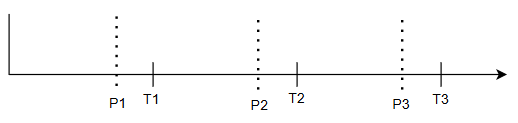
Values detected after P1 will snap to T1 before shifting. Values detected after P2 will snap to T2 before shifting....
In our /STAT1D scenario, a value reported between 6 PM and midnight, snaps to the next calendar day at 00:00:00 before shifting back one day.
If the configuration read /STAT10M, a value reported within 15 seconds of the next minute is snapped to the next minute and then shifted back ten minutes.
Communication is lost and regained...
...in the same period
Reports and line charts appear continuous. The value reported for that period will be the value read when communication was regained. That is the most recently confirmed value for that period.
...before the end of the next period
Reports and line charts appear continuous. The period when communication was lost is unaffected because the value that was recorded before comms loss stands. The value recorded for the next period may take longer to arrive, but as long as communication is regained before that period ends, a value will be recorded for that period.
...for longer than two periods
Reports and line charts will have a gap. No value will be recorded for the period after comms loss until a period with comms regained.
Data Suffixes for Tag I/O Addressing
Change the STAT deadband: DriverStatTolerance
