Tag Identification
Navigate to the Tag Identification dialog by clicking the ellipsis button beside the Name field found in the ID tab of any tag property accessed from the tag browser.
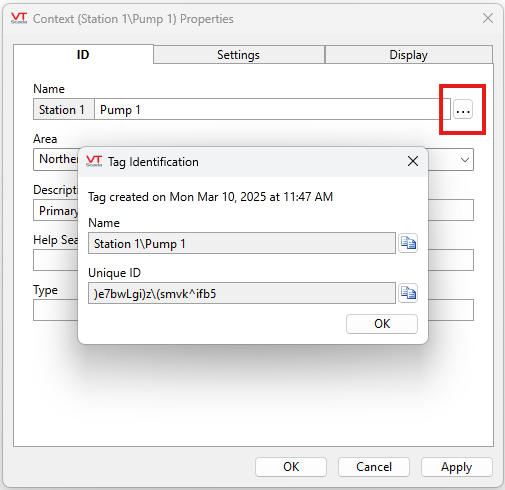
Information Available
Tag Created
Displays the date and time that the tag was created.
Name
Displays the name of the tag as seen in the tag browser. Styled as a breadcrumb trail, this name is determined by the parent/child relationship of the tag relative to other tags in its hierarchy. This field is not editable. The last portion of this name can be edited by changing the name of the tag in the ID tab and the rest of the name will be altered if the tag is moved. See Move and Rename Tags for more details.
Copy this name by highlighting and typing Ctrl+C or by clicking the double page button ( ) next to the Name field. This will add the text straight to your clipboard.
Unique ID
This identifier is immutable. It is completely uneditable and unaffected by changes made to the tag (location or otherwise). VTScada uses this identifier to keep tabs on this tag and its history in a secure and stable manner that affords the user more flexibility in their application. The name of a tag may change, its location may change, the language used may change but expressions and hierarchies will not be disrupted because it is this immutable and unique ID that VTScada goes by. You may have stumbled upon unique IDs when using expressions or glancing at the code.
This field is useful for debugging and troubleshooting. Copy this ID by highlighting and typing Ctrl+C or by clicking the double page button () next to the Unique ID field. This will add the text straight to your clipboard.
