Active Directory Query Utility
This utility is included with every copy of VTScada, but must be added to the VAM using the Find Existing option of the Add Applications wizard.
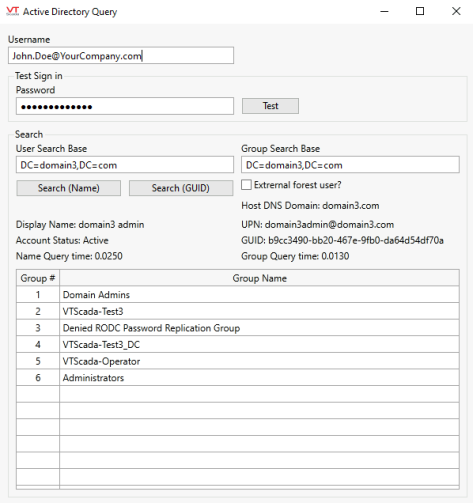
- Use this to gather information about accounts on your Windows Active Directory system. There are two functions, both of which require that you provide a valid username in the form shown.
- Use the Test button to confirm the existence of an account, and check the password. If the combination of username and password will allow you to sign-in to Windows, the test will pass.
- Use the Search (by Name or GUID) to gather information about a username as shown in the following example. A valid username must be provided, along with the Active Directory domain to be searched.
For Windows Authentication with Trusted Domain users
To search for user information and security group information, fill in a username and password and click "Test".
With "Sign in: passed" displayed:
- "Search (Name)" and "Search (GUID)" will be enabled and functional.
- "User Search Base” is auto-populated .
- “Group Search Base” remains as it is because security groups should be searched on the host domain and not on the user management domain.
For users of separate forests The name of the hosting machine, check the “External forest user?” checkbox before searching for user information via Search (Name) and Search (GUID) button.
