Add Scroll Bars to a Page
You may need to add scroll bars to the VTScada display if you are attempting to edit an application while using a monitor that is smaller than the one that the application was created on. This can be done in a way that affects only your workstation. To force scroll bars (when a page is larger than your monitor) set the width and height (DispMgrWidth and DispMgrHeight) to match your current screen size.
Step by step:
- Open the Application Configuration dialog.
- Select the Edit Properties page.
- Find and select the property DispMgrWidth.
- Click Copy.
- Set the width value to match your display.
- Enter your workstation name in the space provided. (You may be able to select it using the drop-down list.)
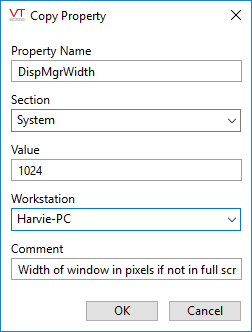
- Repeat for DispMgrHeight.
- Click Apply.
- Provide a comment in the dialog that opens and click OK.
- Click OK to acknowledge that the application must be restarted before the changes will go into effect.
- Re-start the application on your workstation.
