
Used by: Driver Multiplexer tag.
* Does not use the Style Settings tag.
The Subordinate Lines widget displays two lines that represent the primary and secondary subordinate drivers of a Driver Multiplexer and indicates which of the two is the active driver.

In the Subordinate Lines widget, whichever of the two lines represents the active driver will use the color, style, and width settings for the active subordinate. The other line will use the color, style, and width settings for the inactive subordinate. If the widget is unlinked, both lines will follow the settings for the inactive subordinate. A line representing a driver that is missing will also use the settings for the inactive subordinate.
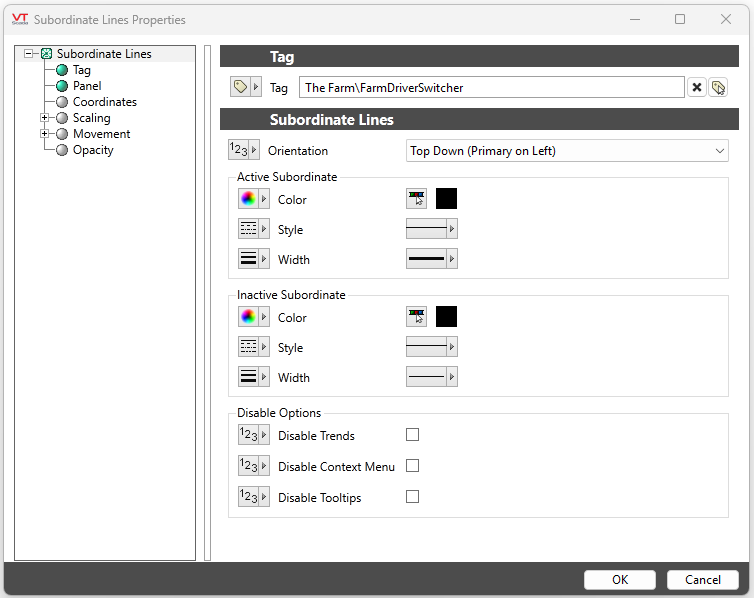
The properties dialog for the Subordinate Lines widget:
Orientation
The Subordinate Lines widget's angled lines each represent one of the two subordinate drivers of ;the Driver Multiplexer. The Orientation drop-down menu sets the direction the lines face.
In the "Top Down" and "Bottom Up" orientations: primary driver = left line; secondary driver = right line.
In the "Left to Right" and "Right to Left" orientations, the primary driver is represented by the line of the top
Active Subordinate
Sets the color, style, and width of the line representing the active subordinate driver.
Inactive Subordinate
Sets the color, style, and width of the line representing the inactive subordinate driver.
Disable Options
Disable selected operator-interaction features of this widget.
See: Operator Interaction Controls
Tag Types\Communications\Link Management\Driver Multiplexer
