Page List Widget
Used by: User-defined tag types with matching parameterized pages.
* Does not use the Style Settings tag.
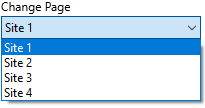
The Oil & Gas Solutions (OGS) page list widget is a navigational control, designed to work with parameterized OGS display pages. It allows the operator to jump to a given site in a list without needing to reopen the page menu. (In other words, it re-opens the page with a new value for the site parameter.)
This widget can be extensively customized, but its configuration requires planning and an in-depth knowledge of your application’s tag structure.
As an illustration, refer to the partial tag tree shown in the following image. In this example, each Site is a user-defined type, given the type name "SiteType". This will be relevant to the explanation of the button parameters.
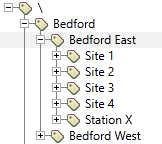
Assume that a parameterized page exists for a “SiteType”, displaying tags within that site. Drawing the Page List widget on that page and configuring it with the parent tag, Bedford East, will allow an operator to step through Sites 1 through 4 (and optionally, Station X, which is also a SiteType) without leaving the page and without needing to access the page menu.
The properties dialog shown here is configured for above example of Bedford East sites. "SiteChoice" is the name that was given to the page's parameter.
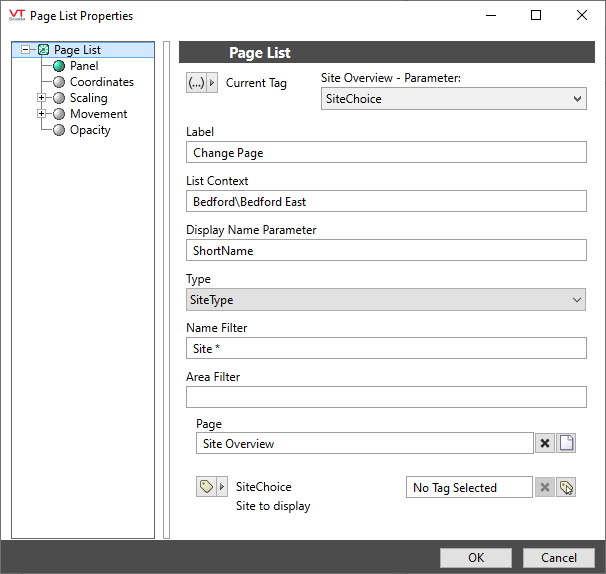
Current Tag
Used by the widget to keep track of which site is being shown. In almost all cases, this should be the page parameter, through which the site is passed, as shown in the example image.
This parameter is mandatory, and the widget button will be grayed out unless a valid tag (parameter) has been selected.
Label
Provide text that identifies the purpose of the list.
List Context
Type in the full (absolute) path and name of the tag that is the parent of the sites you want to step through. In the provided example, this is Bedford\Bedford East.
Display Name Parameter
The name of the tag parameter that you want to display in the list, identifying one site from another.
Typically, this will be ShortName, although Name is sometimes used in order to provide more context. To display the description of each site instead of the name, wrap the parameter name in a \GetPhrase() call: \GetPhrase(Description).
A parameter from your custom tag type could also be used.
Type
A filter to identify the tag type matching the parameter. In the provided example, the user-defined type was named "SiteType". (This is not a standard VTScada type.)
If not provided, all child tags of the identified context will be used, some of which may not be appropriate for the page parameter.
If the type is set to Context, then further filtering is likely to be necessary.
Name Filter
An optional parameter to limit the list to sites with names matching the filter. Wildcards (*) should be included. In the provided example, four of the sites follow a pattern, Site N, but one is named Station X instead. If no name filter is provided, all five site tags will be shown as the operator steps through the list.
A name filter such as Site* would exclude the site name Station X.
Area Filter
An optional parameter to limit the list to sites with area properties matching the filter. Wildcards (*) may be included.
Page
Typically, the name of the page upon which this navigational button is drawn. As shown in the example, do not configure the parameter for this use case. Use the page selection tool rather than typing the page name.
If left blank, the list will navigate to the default VTScada Sites List Display Options
Disable Options
Disable selected operator-interaction features of this widget.
See: Operator Interaction Controls
