Notebook Pen Property Reference
The appearance of the markers, placed on the graph when you add a note, can be adjusted as follows:
- Double-click the entry, or click the gear icon to open the properties dialog.
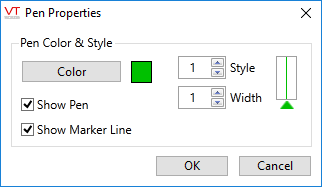
| Digital Pen Properties Element | Description |
|---|---|
| Show Pen | Hides this tag's pen when not checked. |
| Show Marker Line | When checked, the note's placement on the graph is shown with both an arrow and a vertical line. Deselect to remove the vertical line. |
| Color | Opens the Select Color palette, which you can use to select a new color for the pen. |
| Style | A spin-box that you can use to change the line style (solid, dashed, etc.). Affects the choice of width, in that you cannot select a wide line for any style other than solid. |
| Width | A spin-box that you can use to set the width of the pen. Affects the choice of style, in that choosing a wider line forces the line style to be solid. |
