Dialing-in. The Alarm Notification System Menu
This information applies only to VTScada installations that include the optional Alarm Notification System. If your application has this feature, and you are one of the operators on the callout roster, then the following will help you to work with the Alarm Notification System menu.
The VTScada Alarm Notification System will begin each phone call by announcing itself and requesting your authorization code, which is the Alternate Identification Value that your manager defined for you in the security Accounts dialog (Configure Alternate Identification). The wording of the announcement is controlled by your VTScada Developer, but typically begins with the words "This is the VTScada system at <your company>."
You can enter your Alternate Identification by dialing the number on your phone. If your employer is using Twilio, you can also speak your Alternative Identification number out loud. What happens after you have entered your Alternate ID depends on how your developer has configured the system. You may begin with the Main Menu, or the developer may have configured the system to go directly to one of:
- The list of unacknowledged alarms.
- The list of active alarms.
- The control menu.
- The station status menu.
The following sections describe your options in each of these menus.
The Alarm Notification System Main Menu
From the main menu, you may press a number from 1 to 4 to access any of the other menus, or you may press star (*) to hang up.

The Alarm Notification System Unacknowledged Alarms Menu
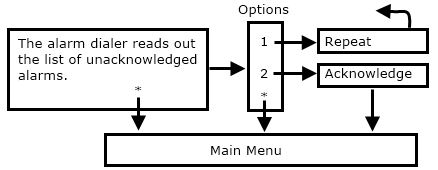
The list of unacknowledged alarms spoken depends on two things: First, only alarms in the area you are permitted to view will be spoken. Second, if the Alarm Notification System initiated the call, then only the alarm(s) that caused that call to be made will be spoken. If you called the VTScada Alarm Notification System, then all unacknowledged alarms in areas that you are permitted to see will be spoken.
After the list is read, you can press 1 to repeat, 2 to acknowledge, or * to return to the main menu.
The Alarm Notification System Active Alarms Menu
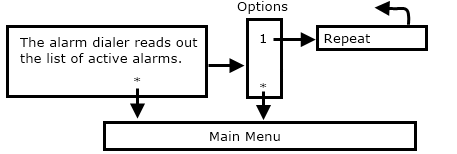
The list of active alarms, in areas that you are permitted to view, will be read.
You can press 1 to repeat the list or * to return to the main menu.
The Alarm Notification System Control Menu
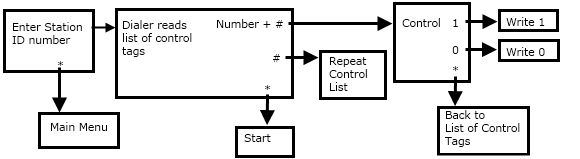
Start the control menu by entering the ID number of the station whose tags you want to control.
The alarm notification system will read the list of control tags in this area. Enter the number of the output tag that you want to control, followed by the # key. Entering just the # key at this point causes the list to repeat.
You can control the tag by pressing 1 to write a 1 or "ON" value, or you can press 0 to write a 0 or "OFF" value. Pressing the * key will take you back to the list.
The Alarm Notification System Station Status Menu
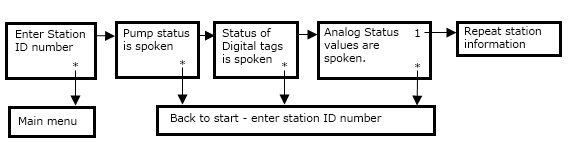
Start this menu by entering the ID number of the station whose tags you want to learn about. For the given station, the system will read the current values of the Pump Status tags followed by the Digital Status tags, followed by the Analog Status tags.
You can press 1 to repeat the information or * to return to the beginning.