
The ability to create and edit page notes is controlled by the security privilege, Page Note Edit.
Page notes are different from operator notes in that they can be deleted.
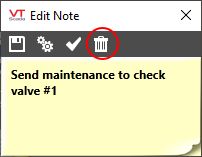
- Double-click on the note you wish to delete.
The Edit Note dialog opens, providing you with a delete button.
- Click once on the delete button to immediately and permanently delete the note from the system.
A record of this action, including the text of the note that was deleted, will be added to the VTScada events history.
Troubleshooting:
- You are unable to access the properties, or delete the note.
Your security privileges do not include this ability. Check with your supervisor.
