Common Module
Various user-interface features are common to the VTScada tag widgets. The widgets will issue calls to the Common module of the associated tag to provide the contents and functionality of the interface feature. These may include a call to the Navigator module (context menu), the ToolTip module, and the PkTrend module. Any external graphic modules must make a call to the Common module within the tag. The Common module takes four parameters that define the area of the screen occupied by the drawing object and three that allow an instance of a tag to disable the user interface elements. The seven parameters of the Common module are:
- Left - Any numeric expression for the object's left side coordinate.
- Bottom - Any numeric expression for the object's bottom coordinate.
- Right - Any numeric expression for the object's right side coordinate.
- Top - Any numeric expression for the object's top coordinate.
- DisableTrend - Any Boolean expression for disabling the trend window
- DisableNavigation - Any Boolean for disabling the right-click menu
- DisableTooltip - Any Boolean expression to disable the tooltip display
For example, most widgets will display a pop-up menu in response to a right-click.
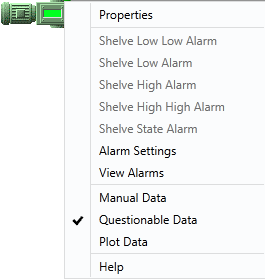
The menu that appears is under your control via the Navigator module. It is up to you to decide what to include in this module for your custom tags and what each entry should do.
