Cryptography Version Upgrade
The method that VTScada uses for encryption was upgraded in VTScada 12.3. All new applications created from VTScada 12.3 onward will use this latest version by default. Applications that pre-exist VTScada 12.3 must undergo an upgrade process to switch from the old method to the new method; only applications that are eligible to upgrade will prompt the user to start the automatic process. Data encrypted using the new cryptography version cannot be decrypted on VTScada versions before 12.3, potentially leading to unexpected behaviors. Before you can start the upgrade process, all workstations that have run an application must either be updated to VTScada 12.3 or have not run the application in the past 90 days.
It is highly discouraged to upgrade your cryptography version and then run the application on a workstation with an older version of VTScada (12.2 or earlier). It is not impossible, but may produce unexpected behavior on that workstation.
When you start an application after upgrading to 12.3 you may be prompted with a dialog similar to this:
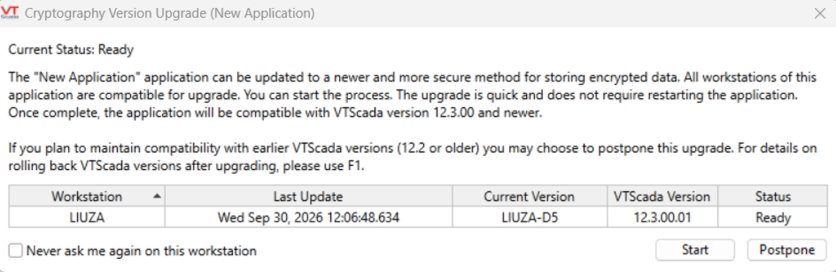
The Current Status and message displayed in the prompt will depend on the eligibility of your workstations for upgrade
The table lists all workstations that have run this application and includes information to help you decide when to start the upgrade process.
Workstation
This column will list all workstations that have run the application.
Last Updated
The last time that the workstation was known to process a version log change. A workstation that hasn't processed version log changes in a long time probably has not run the application recently.
Current Version
The version number of the application as of the last time the application ran.
VTScada Version
The version of VTScada running on the indicated workstation as of the last time the application ran.
Status
Indicates the eligibility of the workstation for upgrade.
Ready means the workstation runs VTScada 12.3+, Unknown means the workstation runs an older version but has been inactive for a long time (>90 days) and therefore may be out-of-use.
"Never ask me again on this workstation"
An option to disable the prompt in the future. If this is checked, the user should click "Postpone".
This is a useful feature for workstations from which the upgrade will not be started.
Start
Click to start the upgrade process.
Postpone
Click to postpone the upgrade process. The prompt will reappear at the next application startup, unless "Never ask me again on this workstation" is checked.
If "Never ask me again on this workstation" is checked at every workstation and the upgrade is postponed at every workstation you will never see the prompt again and you must contact support to upgrade.
About the Current Status and message included in the prompt
To summarize this entire subsection, it is strongly recommended that all workstations that will continue to run the application upgrade to VTScada 12.3 or later and then upgrade their cryptography version.
The current status indicates whether this application is ready for a Cryptography Version Upgrade. The current status may be:
- Ready
- Unknown
- Not Ready
Ready
Display Message: "All workstations of this application are compatible for upgrade. You can start the process."
This indicates that all workstations are in Ready status. The application is ready for the upgrade at very low risk of incompatibility.
Unknown
Display Message: "The application has at least one workstation whose VTScada version is below 12.3 but has been inactive for at least 90 days. You can start the process if they are no longer used."
This indicates that the current application may be ready for the upgrade if all the workstations displayed with an "unknown" status are actually no longer used.
If a workstation with an Unknown status is still in use, it is recommended that you upgrade that workstation to VTScada 12.3 or later before starting the cryptography version upgrade.
Not Ready
The Not Ready status is for internal use only. VTScada will not display any prompt to upgrade the cryptography version if a workstation has a "Not Ready" status.
A workstation that is "Not Ready" is running a version of VTScada that is older than 12.3 and has recently been active. This may indicate that the workstation is still in use and upgrading the cryptography version presents a high risk of incompatibility.
To resolve the "Not Ready" status and trigger the upgrade prompt, it is recommended that all active workstations be upgraded to VTScada 12.3 or later.
If you have recently retired a workstation, with no intention of using it again, and you want to upgrade your cryptography version you must wait out the 90 days without running the application from that workstation.
You may consider decommissioning actions such as uninstalling VTScada or removing the application from that workstation to prevent accidental activation.
Rolling back the Cryptography Version
Once the cryptography version has been upgraded on your application, you are very strongly discouraged from adding any new or existing workstations running an earlier version of VTScada (VTScada 12.2 or earlier). It may produce unexpected behavior on that workstation.
If you must run a new or existing workstation with an earlier version of VTScada, you can roll back your cryptography version first.
To roll back your cryptography version:
- In Application Configuration, go to Show Version Log from the left-hand menu.
- If the current workstation was not the one to initiate the upgrade process, select that workstation in the list of workstations.
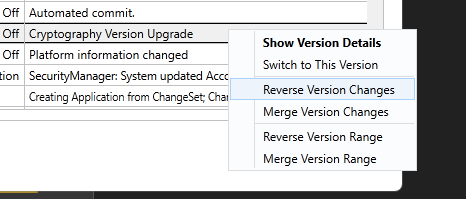
- Browse the Version Log table to find records with the comment "Cryptography Version Upgrade".
- Right-click them and select, "Reverse Version Changes"
- All of the changes that will be affected by this reversion will be displayed. If you have made additional changes to the same parameters since this cryptography version upgrade, they will be overwritten.
CryptoVersion (property: indicates the current cryptography version)
Encode (function: contains a cryptography sensitive parameter)
BlockEncrypt (function: contains cryptography sensitive parameters)
DeriveKey (function: contains a cryptography sensitive parameter)
