How Reports Collect Data
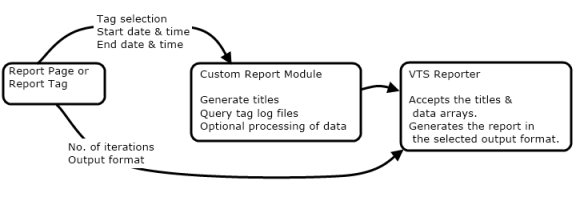
All reports make use of the GetTagHistory(1) function to query logged data. This function returns a pointer to an array of values from each tag, according to the query parameters. It also returns a pointer to a variable which will contain an error code. That variable will be INVALID until GetTagHistory completes, at which time it will be set to zero for success or a numeric value to indicate the error.
The main query parameters include:
- The object value of the tag whose data you are querying.
If querying a set of tags, launch a separate instance of GetTagHistory for each. - The start and end times for the query in UTC.
Note that the report page and report tag present time using the local time format. Your report module must convert that to UTC before running the query. - The query mode, specifying whether you want raw data or an aggregation such as minimums or maximums over a time period.
- The time period to use for aggregations. This is usually not the same as the difference between the start and end times. For example, an operator might want an hourly snapshot report for the previous 24-hour day.
The resulting array of data is then formatted for the report. Note that the following options are available when you write your own reports:
- You can control launches of GetTagHistory when querying many tags:
a) A very large number of queries will take time to complete. You can break that into several sets of queries, updating a progress display to inform the operator that the task is underway.
b) Launching an extremely large number of queries at the same time may over-tax system resources. - You can create any title, header, and formatting that you wish, although you are advised to keep the formatting simple.
- Do post-processing of the returned data.
You can present the returned arrays exactly as obtained, or you can use VTScada's math libraries to analyze, filter, sort and summarize the data before presentation.
(1)GetTagHistory replaces the older function GetLog. GetLog is still supported and Legacy applications that made use of that function can continue to do so.
