Alarm Database Groups
(Property name: AlarmDatabaseGroups)
For the majority of applications, there is no need to create extra alarm databases, but locations that maintain large distributed systems might choose to do so. For those that do, it is possible to create display groups so that alarms from several, but not all, databases can be viewed at the same time.
Database groups are defined as an application property, AlarmDatabaseGroups. Multiple groups can be defined within the single property, each with a list of databases. Separate the groups with semi-colons and database names within each group by commas.
[System]
  AlarmDatabaseGroups       = Northeast Group:NorEast,NorWest;Southwest Group:SouWest,SouEast
Here is one example of an alarm database group:
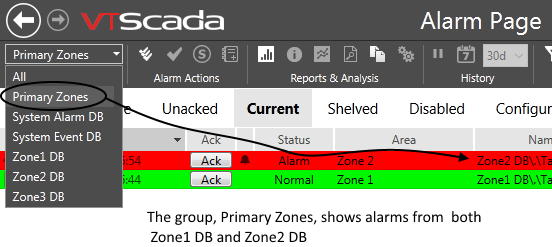
Example: Using an alarm database group
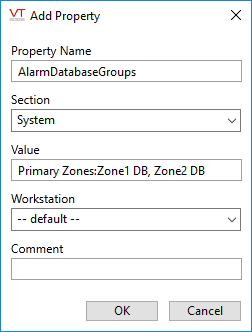
The property definition used for this example:
The entries in AlarmDatabaseGroups refer to the tag names. It is a coincidence that, in the provided example, the descriptions that appear in the screen shot happen to match the tag names.
Section: [System]
Default: AlarmDatabaseGroups =
*No restart required (Settings.Dynamic property)
