Alarm Batch Operations
Many alarm tasks, such as adding a note, can be done only to a single alarm at a time.
Other alarm tasks, such as acknowledging or shelving alarms, can be done to a group of alarms. For these tasks, you will need to Sort and Filter the Alarm List.
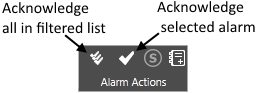
Acknowledge a Group of Alarms
- Open the alarm page
- Filter the alarm list to show only the alarms that you wish to acknowledge.
- Use the Acknowledge All button in the Alarm Page toolbar to acknowledge all shown.
Shelve or Unshelve a Group of Alarms
- Open the alarm page
- Filter the alarm list to show only the alarms that you wish to shelve.
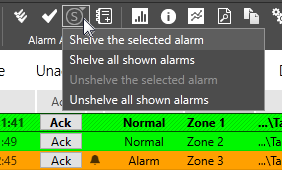
- Use the Shelve All Shown tool in the Alarm Page toolbar to shelve all shown.
Disable a Group of Alarms
Under the ISA 18.2 standard, the ability to disable alarms is a configuration option, done on a tag-by-tag basis by system developers, and is not available to operators.
Use Suppress Alarms instead.
Mute and Silence
Mute applies to all alarms and cannot be done on an alarm-by-alarm basis.
Silence applies to all currently sounding alarms.
Filters do not apply in either situation.
