OPC UA Alarms & Events
All published VTScada IO tags that have alarms configured also have a subordinate node that describes the alarm state and properties. OPC UA Clients can subscribe to a node in the tree to receive alarms for that node and all subordinate nodes.
Consider the following OPC UA Client hierarchy retrieved from a VTScada OPC UA Server using a 3rd party tool:
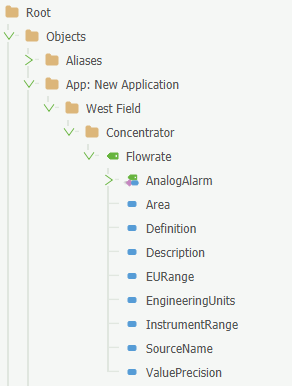
An OPC UA Client could subscribe at any level of the tag hierarchy to get alarms for all of the nodes nested under, including children of nodes.
Subscribe to the whole application, a context tag or to a single IO tag. In the sample hierarchy, subscribing to "West Field" would include alarms for all context tags (and their children) subordinate to West Field. Subscribing to Flowrate would get alarms for that IO tag specifically.
For OPC UA server wide alarm subscriptions, subscribe to the Server node outside the application node hierarchy.
Like IO tags, alarm nodes have a (large) collection of properties. See the properties nested under "Analog Alarm":
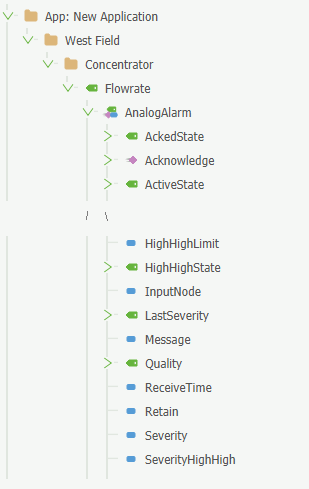
Alarm Acknowledgment
Alarms can be acknowledged by an OPC UA Client as long as their authenticating user account has the permission OPC UA Call.
OPC UA Call allows the user to call supplied methods. At this time, acknowledging an alarm is the only supported OPC UA Method.
When you move to acknowledge an alarm through a client, the OPC UA Client requests that VTScada acknowledges the alarm. Alarms acknowledged by way of an OPC UA Client are recorded in the VTScada Alarm History including the user account that acknowledged the alarms.
An alarm and event feed can be created within the OPC UA node tree. You must enable, "Show alarm event feed" from the Settings tab of the relevant OPC UA Publisher tag.
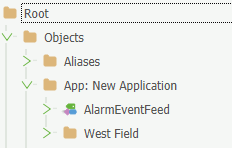
This receives alarms and events directly from VTScada, effectively providing the same record as the VTScada Alarm History. The feed is not retained historically by VTScada and only echos alarms and events as they occur. Multiple publishers may define the alarm and event feed under a single namespace without introducing duplicates of events for an application.
Depending on the OPC UA Client application that you are using to view the alarm and event feed, you may need to enable "VTScadaHistoryEventType" in your data access view configuration.
