
An OPC UA Publisher tag will publish values from I/O tags to the VTScada OPC UA Server. An OPC UA Server configuration is not complete unless it has one OPC UA Server tag and at least one OPC UA Publisher tag. Without a configured OPC UA Publisher tag, the VTScada OPC UA Server will not start.
IO tags can link to an OPC UA Publisher tag to publish values to the VTScada OPC UA Server. An application may have more than one Publisher tag. This may be helpful if, for example, you want to group devices logically, would like to publish values to a specific namespace, or with different permissions enabled or to enforce realm access.
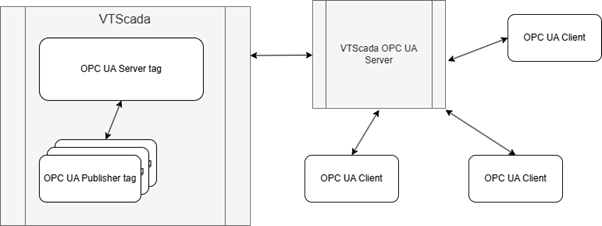
A simplified concept diagram of VTScada's OPC Server
 ID tab
The ID tab of every tag includes the same common elements: Name, Area, Description, and Help ID.
Name:
Uniquely identifies each tag in the application. If the tag is a child of another, the parent names will be displayed in a separate area before the name field.
You may right-click on the tag's name to add or remove a conditional start expression.
Area
The area field is used to group similar tags together. By defining an area, you make it possible to:
- Filter for particular tag groups when searching in the tag browser.
- Link dial-out alarm rosters to Alarm tags having a particular area.
- Limit the number of tags loaded upon startup.
- Filter the alarm display to show only certain areas.
- Filter tag selection by area when building reports.
When working with Parent-Child tag structures, the area property of all child tags will automatically match the configured area of a parent. Naturally, you can change any tag's area as required. In the case of a child tag, the field background will turn yellow to indicate that you have applied an override. (Orange in the case of user-defined types. Refer to Configuration Field Colors).
To use the area field effectively, you might consider setting the same Area for each I/O driver and its related I/O tags to group all the tags representing the equipment processes installed at each I/O device. You might also consider naming the Area property for the physical location of the tag (i.e. a station or name of a landmark near the location of the I/O device). For serial port or Roster tags, you might configure the Area property according to the purpose of each tag, such as System or Communications.
You may define as many areas as you wish and you may leave the area blank for some tags (note that for Modem tags that are to be used with the Alarm Notification System, it is actually required that the area field be left blank).
To define a new area, type the name in the field. It will immediately be added. To use an existing area, use the drop-down list feature. Re-typing an existing area name is not recommended since a typo or misspelling will result in a second area being created.
There is no tool to remove an area name from VTScada since such a tool is unnecessary. An area definition will exist as long as any tag uses it and will stop existing when no tag uses it (following the next re-start).
Description
Tag names tend to be brief. The description field provides a way to give each tag a human-friendly note describing its purpose. While not mandatory, the description is highly recommended.
Tag descriptions are displayed in the tag browser, in the list of tags to be selected for a report and also on-screen when the operator holds the pointer over the tag’s widget. For installations that use the Alarm Notification System, the description will be spoken when identifying the tag that caused the alarm.
The description field will store up to 65,500 characters, but this will exceed the practical limits of what can be displayed on-screen.
This note is relevant only to those with a multilingual user interface:
When editing any textual parameter (description, area, engineering units...) always work in the phrase editor. Any changes made directly to the textual parameter will result in a new phrase being created rather than the existing phrase being changed.
In a unilingual application this makes no difference, but in a multilingual application it is regarded as poor practice.
Help Search Key
Used only by those who have created their own CHM-format context sensitive help files to accompany their application.
The Settings tab is where you configure:
- The OPC UA Server tag that works in tandem with this Publisher tag
- Where published values are addressed in the OPC UA server space
- A login prefix that is unique to the VTScada application on the controlling machine
- Optional security restrictions
- Alarm event feed
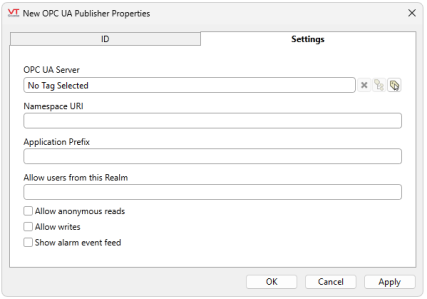
OPC UA Server
Select an OPC UA Server tag.
Namespace URI
An OPC UA Server’s address space is subdivided into namespaces. The OPC UA server maintains a mapping of namespace URIs to numbers and this forms part of the address of a node within the address space. Each OPC UA Publisher tag is configured with a Namespace URI.
Namespace mappings are stored locally at the Configuration Folder address configured in the OPC UA Server tag. This is done to retain namespace mappings across restarts of the OPC UA Server. Hence, we do not recommend deleting or changing the configuration folder without preserving the original namespaces.xml file.
VTScada uses the unique tag name of a VTScada tag for the corresponding node in the OPC UA address space. This is guaranteed to be unique within your VTScada application, however, it is possible that a tag in a different VTScada application could have the same unique tag name.
For this reason, we recommend using a different namespace URI for different applications so that if they share the same OPC UA Server, there is no risk of name collision.
Application Prefix
An identifier of your choosing. This identifier must be prefixed to the user credentials from OPC UA Clients to the server. It serves as a differentiator in the event that more than one VTScada application is using the same OPC UA Server.
Allow users from this Realm
If your application uses security realms, only IO tags publishing through this Publisher will be available to users from this realm. In this way, realm users are restricted to the tags they can see in the OPC UA Server. Global (i.e. non-realm) users have access to all application tags in the OPC UA Server. You can configure multiple Publisher tags associated with the same realm or different realms, as required
If your application does not use realms, leave this blank.
OPC UA Client global credentials typically appear as, application-prefix:username
Realm user app login credentials typically appear as, realm:username
OPC UA Client credentials within a specified realm appear as, application-prefix:realm:username
For example, app:opsrealm:johnsmith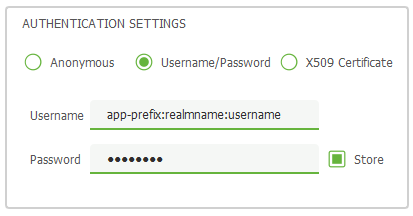
Note, that while a colon is used as the delimiter by default, this is changeable in your application's security options. If more than one application shares the same OPC UA Server, both applications must be configured to use the same delimiter.
Allow anonymous read access
Enable to allow anonymous users read-only access. OPC UA Clients still require to be authenticated using a certificate, but anonymous users on an approved client can access IO tags published through this Publisher. This checkbox applies where an authenticated client is in use by an anonymous user. In such cases, read-only access is enforced.
Allow writes
Enable to allow clients to write to IO tags if the tag can be written to and only for users that have OPC UA Write permission.
Show alarm event feed
Enable publishing of an alarm event feed to the OPC UA server. One alarm and event feed will appear in the OPC UA Server address space per Namespace URI.
