Writes a specified body to an HTTP POST message. The contents of the body may be JSON, XML or other formats.
Each POST to the server will correspond to a single tag or alarm update from VTScada. The authentication methods available include basic authentication, a custom token and OAuth 2.0.
Only the current VTScada RPC service server will publish to the server. All other potential servers will handle registration of publishable tags but not enable publishing until taking over as the primary for the publisher service.
A successful publish operation sets the tag value to 0. On failure, the tag value is set to the returned HTTP status code, which indicates the cause of the failure. Administrators can use this value to troubleshoot communication or server issues.
 HTTP Publisher Properties ID Tab
The ID tab of every tag includes the same common elements: Name, Area, Description, and Help ID.
Name:
Uniquely identifies each tag in the application. If the tag is a child of another, the parent names will be displayed in a separate area before the name field.
You may right-click on the tag's name to add or remove a conditional start expression.
Area
The area field is used to group similar tags together. By defining an area, you make it possible to:
- Filter for particular tag groups when searching in the tag browser.
- Link dial-out alarm rosters to Alarm tags having a particular area.
- Limit the number of tags loaded upon startup.
- Filter the alarm display to show only certain areas.
- Filter tag selection by area when building reports.
When working with Parent-Child tag structures, the area property of all child tags will automatically match the configured area of a parent. Naturally, you can change any tag's area as required. In the case of a child tag, the field background will turn yellow to indicate that you have applied an override. (Orange in the case of user-defined types. Refer to Configuration Field Colors).
To use the area field effectively, you might consider setting the same Area for each I/O driver and its related I/O tags to group all the tags representing the equipment processes installed at each I/O device. You might also consider naming the Area property for the physical location of the tag (i.e. a station or name of a landmark near the location of the I/O device). For serial port or Roster tags, you might configure the Area property according to the purpose of each tag, such as System or Communications.
You may define as many areas as you wish and you may leave the area blank for some tags (note that for Modem tags that are to be used with the Alarm Notification System, it is actually required that the area field be left blank).
To define a new area, type the name in the field. It will immediately be added. To use an existing area, use the drop-down list feature. Re-typing an existing area name is not recommended since a typo or misspelling will result in a second area being created.
There is no tool to remove an area name from VTScada since such a tool is unnecessary. An area definition will exist as long as any tag uses it and will stop existing when no tag uses it (following the next re-start).
Description
Tag names tend to be brief. The description field provides a way to give each tag a human-friendly note describing its purpose. While not mandatory, the description is highly recommended.
Tag descriptions are displayed in the tag browser, in the list of tags to be selected for a report and also on-screen when the operator holds the pointer over the tag’s widget. For installations that use the Alarm Notification System, the description will be spoken when identifying the tag that caused the alarm.
The description field will store up to 65,500 characters, but this will exceed the practical limits of what can be displayed on-screen.
This note is relevant only to those with a multilingual user interface:
When editing any textual parameter (description, area, engineering units...) always work in the phrase editor. Any changes made directly to the textual parameter will result in a new phrase being created rather than the existing phrase being changed.
In a unilingual application this makes no difference, but in a multilingual application it is regarded as poor practice.
Help Search Key
Used only by those who have created their own CHM-format context sensitive help files to accompany their application.
HTTP Publisher Properties Connect Tab
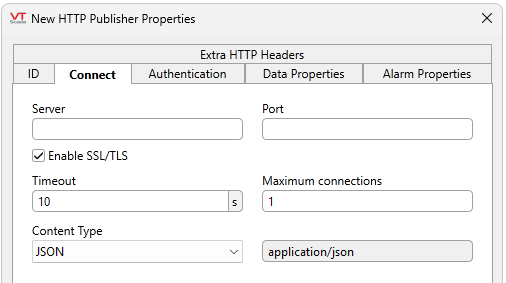
Server
The name of the host for the server.
Port
The port number for the server.
Enable SSL/TLS
Option to enable SSL/TLS. Required for TLS (secured) connections. (Recommended)
Timeout
Time to wait for a response, in seconds. On timeout, the tag retries up to 3 times before giving up.
Maximum connections
The maximum number of concurrent keep-alive connections to maintain per server-port. The default is 1.
Content Type
The media format of the content. The field to the right will display the header value generated per content type. This string is sent to the server, identifying the format of the message body. Selecting the option "other" from the drop-down list will enable editing of the header value field.
- JSON (Default)
- XML
- Other
HTTP Publisher Properties Authentication Tab
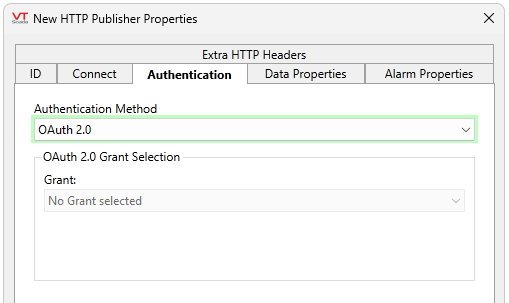
This is where you configure your HTTP authentication header. There are three Authentication Methods to choose from and each one will change the configuration options.
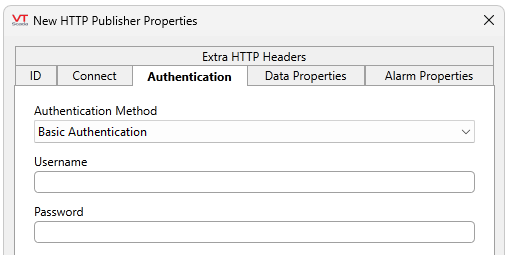
Basic Authentication (Default)
Set the username and password expected from the client.
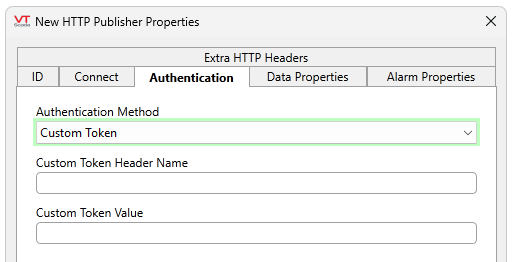
Custom Token
Set the header name of the custom token and the custom token value expected from the client.
OAuth 2.0
Select a configured grant and consent or revoke consent from this tab. See OAuth 2.0 Protocol for more information about configuring OAuth 2.0 with a Client Credential flow in VTScada.
HTTP Publisher Data Properties Tab
When the associated I/O tag changes, the URL path and payload will be encoded based on the settings here. You can use the built-in encoder to replace content-using Placeholder Syntax. The Alarm Properties tab will be configured in a similar manner, however, Data Properties are for value changes while Alarm Properties will be for Alarm Triggers.
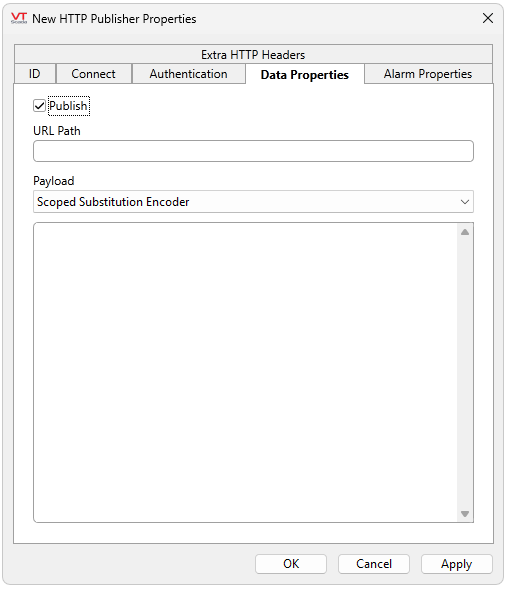
Publish
The tag will publish data when Publish is enabled, and stop publishing data when Publish is disabled. Publish is enabled by default. Disabling this setting is handy during configuration, commissioning and troubleshooting.
URL Path
The URL path portion of the URL. This field supports using placeholder syntax for dynamic configuration.
Payload
The payload of an HTTP POST is the information that you want the client to receive and process, wrapped inside a POST request. This field supports using placeholder syntax for dynamic configuration.
HTTP Publisher Alarm Properties Tab
Alarm Properties are configured the same way as Data Properties. When the associated I/O tag changes, the URL path and payload will be encoded based on the settings here. You can use the built-in encoder to replace content-using Placeholder Syntax. Alarm Properties are for alarm triggers, while Data Properties are for value changes.
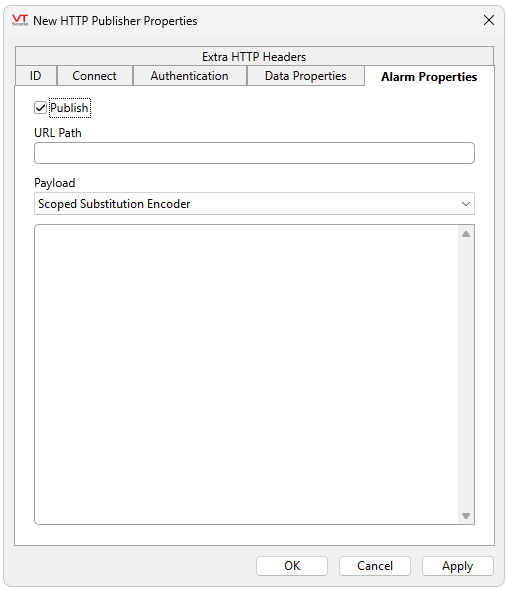
Publish
The tag will publish data when Publish is enabled, and stop publishing data when Publish is disabled. Publish is enabled by default. Disabling this setting is handy during configuration, commissioning and troubleshooting.
URL Path
The URL path portion of the URL. This field supports using placeholder syntax for dynamic configuration.
Payload
The payload of an HTTP POST is the information that you want the client to receive and process, wrapped inside a POST request. This field supports using placeholder syntax for dynamic configuration.
HTTP Publisher Extra HTTP Headers Tab
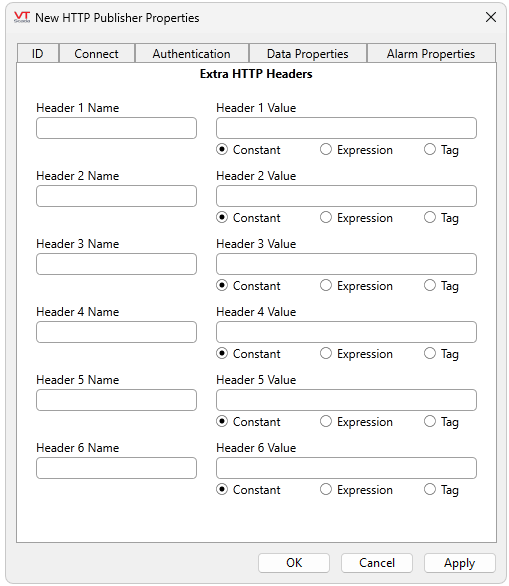
Some APIs may require extra information such as tokens or form data. Use this tab to specify name = value pairs to be added to the header. Values may be specified here or supplied from expressions or tags.
VTScada's HTTP Publisher tag has a built-in encoder that will handle value substitution using named placeholders. Named placeholders will be supported for accessing information from the published information structure, values in scope of the publisher, and values in scope of the publishing tag.
To distinguish the named placeholder from other potential elements, the placeholder will be wrapped in square brackets with a preceding percent sign (%[TYPE:Variable]).
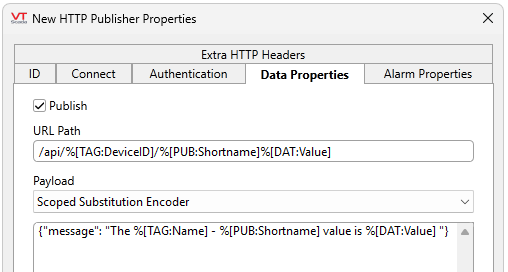
A valid example of placeholders being used to configure the destination and payload in the event of a change in value.
There are three types that represent the intended scope (TAG, PUB, CFG), and one type that represents a structure (DAT).
- TAG - the data is from an IO tag.
- PUB - the data is from the Publisher.
- CFG - the data is from the static tag configuration details
These three types will take the following variables:
- Name
- Area
- Description
- DataType
- DisplayAddress
- Units
- SourceName
- IsCalculation
- ExpectedMin
- ExpectedMax
- ScaledMin
- ScaledMax
DAT Represents the structure being sent when a tag value changes. This type also serves as the dictionary for the Alarm when rendering templates. The following variables are accepted:
- Value
- Timestamp
- Attributes
- RawValue
- ValueType
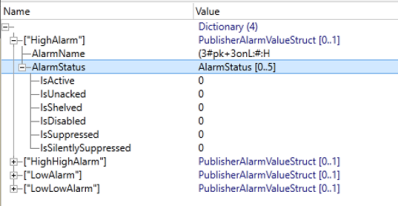
In the Alarm Properties tab (concerning Alarm Triggers), DAT may reference a dictionary. The top-level of the dictionary represents each alarm level and contains Alarm Names and Status information. Available alarms vary depending on the tag type: