Tag Change History
Every change to a tag's configuration is recorded in the VTScada version control system. Hover the pointer over a field to determine when the last change was made and by whom. You can easily spot fields that have been changed during the current editing session, as the background color of changed fields will turn green. The background highlight lasts only for as long as you are editing the configuration folder - each time you open a tag's configuration folder the fields will not be green, waiting for fresh changes.
(Certain actions may cause the field to turn yellow or blue, where each color has a meaning. See: Configuration Field Colors)
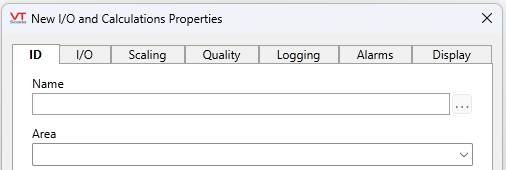
Before editing.
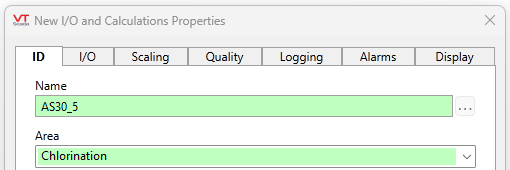
After editing.
If security is not enabled, no user name will show in the history. Otherwise, the name of the user signed in at the time the change was made, will be used.
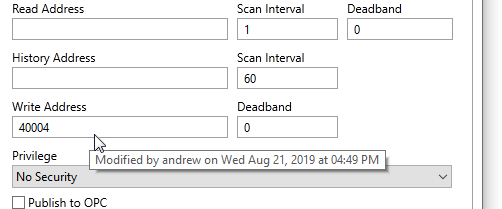
Viewing the change history
Operational changes such as opening and closing valves are stored in the Alarm History, not the version history. See: Alarm history list
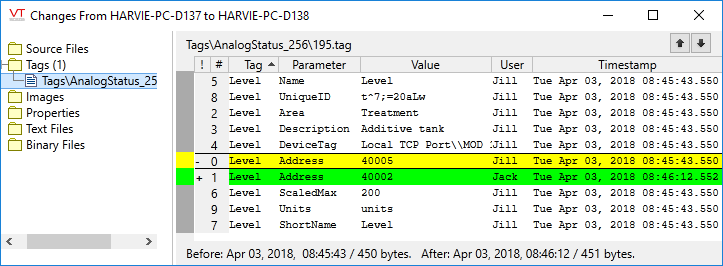
Changes that result from importing a tag file are attributed to the user who imports that tag file. See: Edit Tags Outside of VTScada
The format of the displayed tooltip is controlled by a set of application properties. See: Tag Properties, starting with "ParmInfo".
