FBx Series DNP3 Driver Addressing
The FBx Series DNP3 Driver can perform standard DNP3 read/write(s) and reads for flow computer specific information (file reads).
There are available file types:
| Data Type | Initialism | Description |
|---|---|---|
| Alarm | AL | Alarm Logs |
| Event | EL | Event Logs |
| History | HL | History Logs |
| DP Meter Configuration | MCG | Differential pressure meter configuration |
| Linear Meter Configuration | MCL | Linear meter configuration |
A Floboss DNP3 driver address is made up of 2 or 3 parts that are dependent on the file type and separated by a colon.
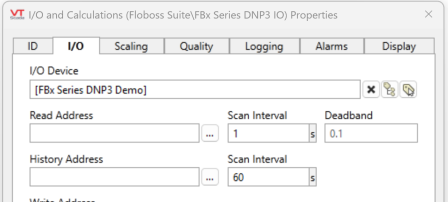
Link your I/O and Calculations tag to your FBx Series DNP3 Driver tag and a button [...] will appear next to the Read and History address fields. This button opens the Address Select, a tool that will guide you through the addressing options.
Alarm (AL)
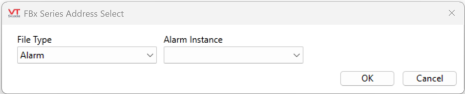
File Type:Alarm Instance
ex. AL:0
-
The file type for alarm logs is represented as AL
-
There is one option available for Alarm Instance; Legal is represented by a 0 in the address.
Event (EL)
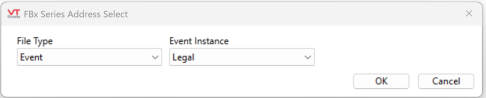
File Type:Event Instance
ex. EL:0, EL:1
-
The file type for event logs is represented as EL
-
There are two options available for Event Instance; Legal = 0 and Non-legal = 1.
History (HL)
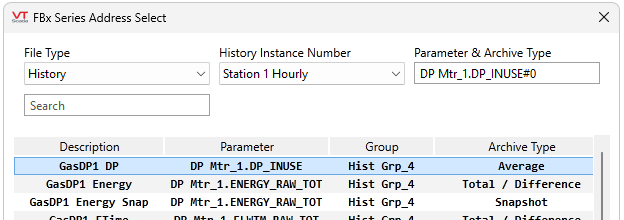
File Type:History Instance Number:Parameter#ArchiveType
ex. HL:6:DP Mtr_1.DP_INUSE#0
-
The file type for history logs is represented as HL
-
The History Instance Number is an enumeration used to determine the History group of the read.
0 --> User Periodic 1 ( Group 1)
1 --> User Periodic 2 (Group 2)
2 - 5 --> Generic (Group 3)
6 - 9 --> Station 1 (Group 4)
10 - 13 --> Station 1 (Group 5)
...
The address assist displays the available options (based on this enumeration) in plain text and converts the entry into a numerical code. -
The Parameter and Archive Type. You must refer to your Emerson FloBoss manual for more information.
Prior with VTScada version 12.2.26, History instance numbers consisted of a History Instance Number and a History Point.
The History Instance Number corresponds with an area and a time interval and the History Point refers to a specific parameter.
For example: HL:20:3.
More information about this addressing scheme is available in the Emerson FloBoss manual.
To maintain backwards compatibility, VTScada will still accept this addressing scheme, however we strongly recommend moving to the updated address format.
DP Meter Configuration (MCG)
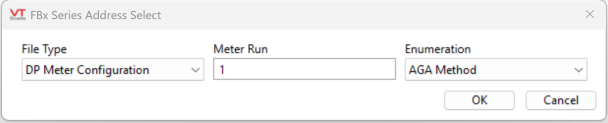
File Type:Meter Run:Enumeration
ex. MCG:1:64
-
The file type for DP meter configuration is represented as MCG
-
The meter run field requires a discrete numerical value identifying the meter run of the Floboss meter
-
Enumeration identifies the specific parameter being configured. The address assist displays the available options in plain text and converts the entry into a numerical code.
Linear Meter Configuration (MCL)
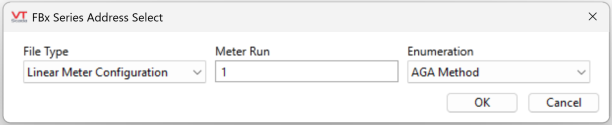
File Type:Meter Run:Enumeration
ex. MCL:3:7
-
The file type for Linear meter configuration is represented as MCL
-
The meter run field requires a discrete numerical value identifying the meter run of the Floboss meter
-
Enumeration identifies the specific parameter being configured. The address select displays the available options in plain text and converts the entry into a numerical code.
Point Name (PN)
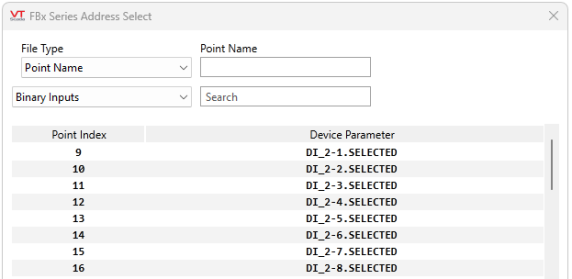
File Type:Point Name
ex. PN:Clock_1.YEAR
-
The file type for Point Name configuration is represented as PN
-
The Point Name field requires an FBx text-based address to convert to a standard DNP3 address so that read/writes can be forwarded to the DNP3 I/O device. The field is populated by selecting an option from the table below.
-
The DNP3 Group (or DNP3 Object) droplist and search field are filters to help find the applicable point. Select the register type from the droplist or optionally narrow the selection by searching for a point index number or device parameter entry. Partial strings will work without needing wildcards.
