Sparkplug B Publisher
VTScada's Sparkplug B Publisher is a tool that publishes I/O tag data using the SparkplugB protocol carried by the MQTT Messaging Queuing Telemetry Transport transport protocol. MQTT is a publish/subscribe protocol that uses a hub and spoke-style network configuration. MQTT is suitable for industrial monitoring where report-by-exception is ideal. It's a lightweight protocol designed for low-bandwidth, high-latency networks that may be unreliable or have shared or intermittent connections. MQTT manages its publish/subscribe model through established "topics" to which applications may publish new metrics or subscribe to be notified when metrics change. VTScada is also able to subscribe to the MQTT network for the purpose of writing to devices in the network. Allowing Incoming Write Commands is disabled by default.
Because the MQTT server, a.k.a. broker, resides at the center of the hub and smartly manages incoming and outgoing data, publishers and subscribers do not need to have a constant connection for it to work and do not need to be compatible with one another.
Sparkplug B is a specification built on top of MQTT. Sparkplug B standardizes the naming of topics, the data types and data encoding, and managing of device communications to make MQTT networks that are scalable and easy to use for multiple parties. That is to say, by following a known standard for naming topics and formatting messages, coordination is easy.
MQTT Publishing with VTScada in a nutshell
At the center of an MQTT network is a server with an MQTT Server (a.k.a. the Broker). A publisher connects with the server, establishes a topic and updates the topic metrics upon change. Assuming security requirements are met, subscribers connect with the broker to follow topics. When new metrics are reported to a topic, the broker passes this along to all who have subscribed.
Multiple publishers could publish to a single topic. Multiple subscribers could subscribe to a single topic.
The tools provided in VTScada for the purposes of publishing are called Sparkplug Edge Node (EoN) and Sparkplug Edge Device (EoD); All I/O metrics must go through an EoN tag to the MQTT server. The EoN does all the work to prepare data for the MQTT server. Logical groups of I/O (such as all the I/O from a single PLC) can be grouped under an EoD, a child of an EoN.
In the world of SparkplugB, the data being reported is called "metrics".
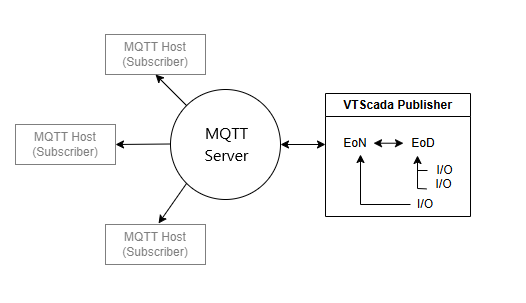
VTScada publishes to an MQTT server a.k.a. broker. Many others may subscribe to receive updates when new data becomes available.
Reliability and Quality in MQTT networks
You may configure up to 5 redundant servers in VTScada for your Sparkplug B Edge Node tag. This is primarily for redundancy and the EoN can switch to using the next available server in line if the current server becomes unavailable . A SparkplugB client can request the EoN to switch to using the next available server by sending a "Next Server" NCMD (Node Command).
The Sparkplug B specifications maintain reliability with these features:
-
Quality of Service (QoS) - confirm a payload has been sent/received.
-
State Management - Track whether devices/applications are online or offline
-
Birth/Death messages - Notifies the broker when EoNs and EoDs connect and disconnect.
A Polling Driver does not belong in an MQTT configuration because this transport protocol works strictly on the basis of report by exception.
Sparkplug B Topics
A publisher constructs a topic name to register with an MQTT broker. This name could technically be anything at all. As long as the publisher continues to publish new metrics under the same topic name and subscribers know the name of the topic to which to subscribe. However, Sparkplug B specifies a very specific and logical format:
namespace/group_id/message_type/edge_node_id/[device_id]
Namespace
For Sparkplug B, this root element will always be spBv1.0
A logical grouping of Edge Nodes. This element is dictated by the first Edge Node (you may only ever have one Edge Node. We could have multiple edge nodes within a group but normally we need one. Also we may have multiple edge nodes within the application but normally need one.) It is automatically generated by VTScada but you may optionally specify it. It can be any valid UTF-8 alphanumeric string except it cannot contain +, /, or #.
The auto-generated group ID is lengthy and geared towards uniqueness. It may be your personal preference to create a short, logical group ID for the purposes of troubleshooting.
Message_type
This element is a single short word that indicates the type of message and therefore how the payload of the message is to be handled. ex. NBIRTH, DDATA, NCMD, DCMD, STATE
Edge_node_id
Sparkplug Edge Node ID. This identifier must be unique under a Namespace/GroupID group. If none is specified, one is automatically generated using the tags full name with backslashes replaced by double underscores to guarantee its uniqueness.
ex. Station1__Well1EON1
Device_ID (optional)
Sparkplug Edge Device ID. This identifier must also be unique with respect to the other devices under the same Namespace/GroupID/EdgeNodeID. If none is specified, one is automatically generated using the tags full name with backslashes replaced by double underscores to guarantee its uniqueness.
ex. Station1__Well1EON1__IO1
Message Types
| DBIRTH | Device Birth. This birth announcement establishes that the Edge Device is active and online. When the Edge Device sends this message it will also define the devices connected to it. If the properties of a Sparkplug Edge Device tag are altered, the Edge Device will send a new birth announcement. |
| NBIRTH | Node Birth. This birth announcement establishes that the Edge Node is active and online. When the Edge Node sends this message it will also define the devices connected to it. If the properties of a Sparkplug Edge Node tag are altered, the Edge Node will send a new birth announcement. |
| DDEATH | Device Death. This death announcement pronounces that the Edge Device is no longer active or online. It contains a very simple payload that only includes a single metric to associate the death event with it's birth. |
| NDEATH | Node Death. This death announcement pronounces that the Edge Node is no longer active or online. It contains a very simple payload that only includes a single metric to associate the death event with it's birth. |
| DCMD | Device command message. For example, a request to use next server. The Edge Node will not respond to commands to write to the I/O metrics. |
| NCMD | Node command message. For example, a request to use next server. The Edge Node will not respond to commands to write to the I/O metrics. |
| STATE | Critical application messages. Typically either "OFFLINE" or "ONLINE" |
| DDATA | Device Data. A DDATA-type message includes metrics that have changed since the last DBIRTH or DDATA message. |
| NDATA | Node Data. An NDATA-type message includes metrics that have changed since the last NBIRTH or NDATA message. |
MQTT Tag Browser configuration
All data outbound for an MQTT server must pass through a Sparkplug B Edge Node tag.
I/O tags may be registered directly with an Edge Node tag (we recommend only few IO tags to be attached to, i.e. registered with, an Edge Node. These should only be IO tags pertaining to the node or app in general as opposed to IO tags pertaining to PLC devices. Please also note that the EoDs tags are more capable at attaching to a large number of metrics and publishing those at large rates (i.e. large rates of DDATA publishing) since they are equipped with configurable queuing mechanisms as opposed to the EoN which has no queuing mechanisms for NDATA publishing.
I/O tags of a logical grouping may be registered to a Sparkplug B Edge Device tag, and the Edge Device tag must be registered to an Edge Node tag. It's handy to think of an Edge Device like a PLC, RTU or any controller that manages multiple I/O.
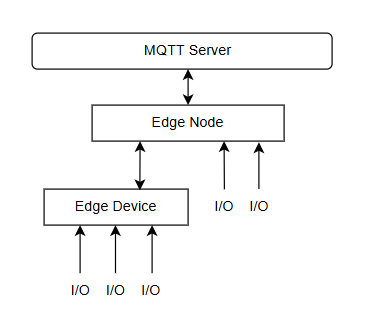
An example of a legal configuration.
It is a best practice to keep the number of tags linked directly to an EoN to a minimum. Use the EoD tags strategically. Remember: EoD tags will buffer and manage incoming data. A single DDATA message can contain many metric values. Group I/O devices in a logical manner under an EoD and link the EoD to the EoN.
Sparkplug Edge Node tag
The Edge Node tag does all the work to prepare data for an MQTT server. It collects data from sensors or Edge Devices, formats it using the Sparkplug B naming and formatting protocol and publishes it to the MQTT server.
Edge Node tag RPC Service
For server configuration, the Edge Node has an RPC Service. As with other RPC Manager Services, a server list can be specified for the Edge of Node tag as opposed to the default server list. The first server listed will be the primary; Only the primary will handle the writes/reads and dissemination of information to the redundant servers. The RPCServerName of the Edge Node is automatically produced as soon as a name is applied to the Edge of Node tag. It will resemble the name of the tag (ex. If the tag is called Well1EON1 and is a child of context tag Well1 the RPCServerName may be Well1\Well1EON1)
As with other redundant server configurations, should the primary server fail, the next server on the list will become the new primary.
Sparkplug Edge Device tag
The Edge Device tag is always the child of an Edge Node tag. It is the muster point for a logical group of devices such as all devices registered on a single PLC. It is intended to model an Edge Device like a PLC or industrial controller in a Sparkplug B environment.
Allowing Incoming Write Commands
The Edge of Node (EoN) tags and Edge of Device (EoD) tags can be configured to write to their linked devices. This would mean that your VTScada application is publishing and subscribing and able to receive, process and execute commands (NCMD or DCMD type messages). You must enable "Allow Incoming Write Commands" in the properties dialog of the Edge of Node tag and in any Edge of Device tags along the pathway.
The command buffer size is customizable from the properties dialog of the Edge of Node tag. This is the maximum number of write commands that each attached tag can buffer simultaneously. Note that the minimum buffer size is 2. Increase the buffer size as needed when anticipating a large number of write commands. If the buffer is full, subsequent DCMD/NCMD messages will be dropped.
All executed write commands, whether successful or not, will be logged in the event log. If the buffer is full and "Start Tracing" is enabled, all dropped write commands will be logged in the Edge Node's log file. Note that each Sparkplug B Edge of Node Tag produces its own .log file, stored in …\MyApplication\Data\TraceFiles\SparkPlugB Edge Nodes Logs\SparkplugBPublisher - EdgeNodeName, .log.
Sparkplug B Behavior in VTScada
The Edge Node and Edge Device tags satisfy the Sparkplug B 3.0.0 protocol. For example, they respond to Birth and Death messages and the EoN responds to, "Next Server" commands. (Both EoN and EoD respond to "Rebirth" command)
The EoN will try the current server to connect, and if it fails to connect after a number of tries (specified in Edge Node tag properties > Connection) it will move on to the next server and so on.
The EoN only accepts the following commands:
-
NCMD: "Rebirth" and "Next Server"
-
DCMD: "Rebirth"
These commands are heavy process. To protect against commands flooding, incoming commands are buffered into a limited queue of length 3 and commands are processed at a rate of no more than 1 per second. Any incoming commands that arrive when the queue is full are dropped.
When a "Next Server" command is processed, the EoN must disconnect and hence all commands left in the queue are dropped and the queue is reset.
The properties of a metric that are carried in BIRTH messages are as follows:
-
Address
-
Area
-
CanRead
-
CanWrite
-
DataType
-
Description
-
ExpectedMax
-
ExpectedMin
-
IsCalculation
-
Name
-
RangeMax
-
RangeMin
-
SourceName
-
UniqueID
-
Units
Sparkplug B Host / Publisher Tag Hierarchy
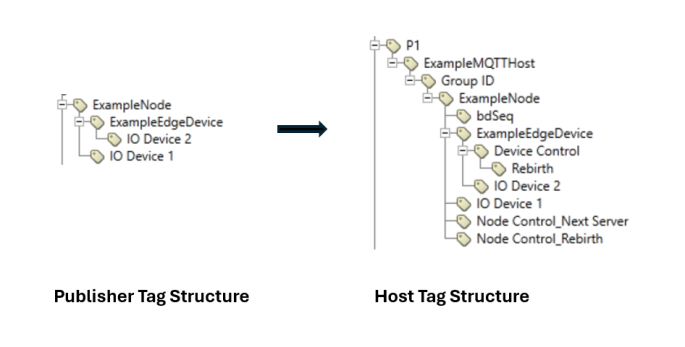
-
ExampleNode: a Sparkplug Edge Node in the Publisher Tag Structure, it is represented as a Context Tags in the Host Tag Structure
-
ExampleEdgeDevice: a Sparkplug Edge Device, it is represented as a Context tag in the Host Tag Structure
-
IO Device 1: an I/O and Calculations Tag sending data to the 'ExampleNode' in the Publisher context, representing that data in the Host context
-
IO Device 2: an I/O and Calculations Tag sending data to the 'ExampleEdgeDevice' in the Publisher context, representing that data in the Host context
-
ExampleMQTTHost: an MQTT Client Driver
-
Group ID: a Context tag with the Group_ID as its display name
-
bdSeq: a Memory entity storing the 'bdSeq' value, used to track sessions by matching an 'NDEATH' message with the previously published 'NBIRTH'
-
Device Control / Rebirth: a Context tag containing a Memory entity that issues a "Rebirth" device command on behalf of the Edge Device
-
Node Control_Next Server: Memory entity that issues a "Next Server" node command on behalf of the Edge Node
-
Node Control_Rebirth: Memory Entity that issues a "Rebirth" node command on behalf of the Edge Node
Memory entities are specially configured I/O and Calculations tags, created automatically and should not be considered actual tags. No Child or I/O tags should ever be created in relation to them.
Troubleshooting - Using Tracer 
Tracer is a logging tool designed to track and record key operational data within the Sparkplug B publisher. You may be asked to enable Tracer by support to help debug, analyze and identify bottlenecks. It should only be enabled when necessary and disabled after use. By Default, Tracer is disabled to avoid potential performance impacts. Each Edge Node tag has its own dedicated "Start Tracing" setting, allowing users to enable of disable Tracer independently for each EoN. This ensures no overlap between logs and allows isolated analysis of individual EoN tags. You can find this setting in the Connection tab of the Edge Node tag properties dialog.
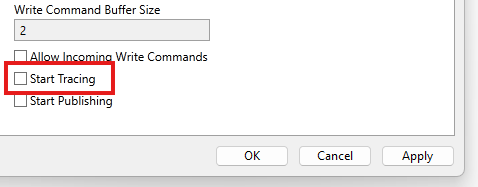
Each Edge Node tag produces its own .log file, stored in …\MyApplication\Data\TraceFiles\SparkPlugB Edge Nodes Logs\SparkplugBPublisher - EdgeNodeName, .log.
The .log file for each Edge Node tag has a maximum size limit of 1 GB. When a .log file exceeds this limit, the oldest half of the log data is automatically deleted to make room for new entries.
Logging Content:
Tracer organized logged data into three primary categories: Published messages, Internal operations, Incoming commands. Each category containing specific titles that allow users to efficiently locate and review desired content.
Published messages:
-
DBIRTH Published
-
NBIRTH Published
-
DDATA Published
-
NDATA Published
-
DDEATH Published
-
NDEATH Published
Internal operations:
-
Register Device: A device is successfully registered.
-
Device Unregister: A device is successfully unregistered.
-
DDATA Queue: One DDATA message is added to the queue.
-
Publishable Tag Register:
-
A new tag is registered.
-
A tag is re-registered due to one or more publishable properties changed.
-
-
Publishable Tag UnRegister: A tag is unregistered.
-
Measurements queue: Measurements queue is not full now.
-
Warning:
-
One device is failed to register due to no valid EdgeDviceID.
-
Failed to publish DDATA for DeviceName.
-
Active DDATA publish count is reached.
-
Max measurements queue size per tag is reached. New incoming messages will cause the oldest message to be removed from the Queue.
-
Failed to publish for a publishable tag.
-
Incoming commands:
-
Incoming Command:
-
Command is rejected.
-
Added a command to the queue.
-
CommandsQueue is full now, and any new incoming messages will be ignored.
-
One Commands is dropped.
-
Start processing command.
-
CommandsQueue is not full now.
-
Implementation:
• Tracer has an internal buffer with a maximum size of 1 MB. When this buffer is full, a FWrite is executed to append its contents to the .log file.
• There is a called module called TraceMonitor to monitor the value of StartTracing. When StartTracing is enabled, it gets the log file stream if it exists. When StartTracing is disabled, it writes the internal stream to the file.
