Station All Outputs Widget
This widget is a part of one of the automatically-built station pages. While it can be added to a user-created page, that is not it's intended purpose.
Used by: Grundfos Control MPC, Grundfos Dedicated Controls, MPE Duplexer Station, MPE SC Station, MultiSmart Station
You can create your own version of this widget, which will work with your custom tag types, by following the directions in the topic Build a Station Widget.
The Station All Outputs widget provides a list of all the station's output tags.
The content and appearance will vary according to the linked tag and the configuration of that tag.

The properties dialog for Station All Outputs widget:
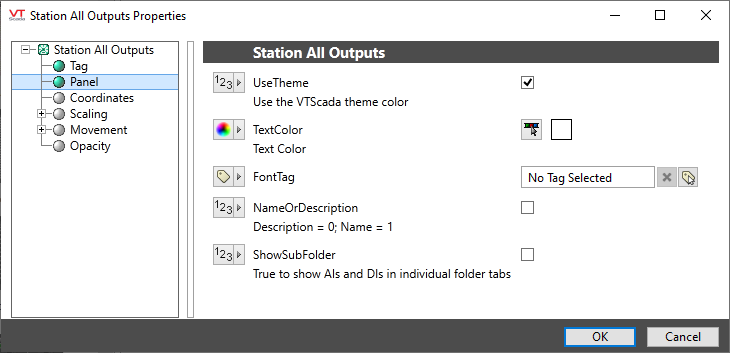
Use Theme
If selected, the overall appearance of the widget will follow the applications color theme. Dark gray otherwise.
Text Color
Sets the color for labels and information within the widget. Defaults to white for visibility against a dark gray background.
Font Tag
Select the font to be used within the widget.
Name or Description
If selected, the tag's name will be shown.
If not selected, the tag's description will be shown.
Show Sub Folder
If selected, analog and digital inputs will be shown in separate folders.
Equipment\Lift Stations\
Tag Types\Pump Station Controllers\MPE\MPE Duplexer Station\
Tag Types\Pump Station Controllers\MPE\MPE SC Station\
Tag Types\Pump Station Controllers\Multitrode\MultiSmart Station\
Tag Types\Pump Station Controllers\Grundfos\Grundfos Dedicated Controls\
Tag Types\Pump Station Controllers\Grundfos\Grundfos Control MPC\
