Write Out to PLC when Alarm Status Changes
Write out to a PLC address during an alarm event. In a common scenario, a PLC is used to trigger a siren, klaxon, illuminated beacon or some other local event to alert operators. Once the alarm has been acknowledged, the PLC stops the alert.
Using an Alarm Status Tag and an I/O & Calculations Tag
A simple way to do this is to create a tag that will monitor for unacknowledged alarms and a second tag that will write out to the PLC when the conditions are met. (ie. alarms acknowledged.)
-
Create an Alarm Status tag.
-
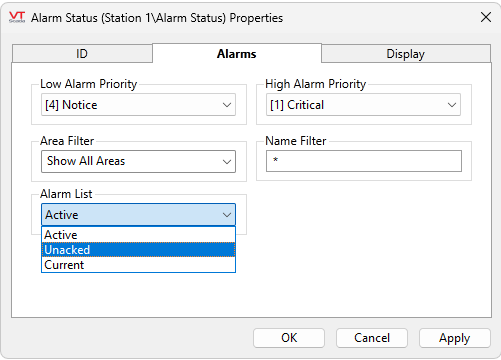
Configure it with the necessary filters for priority, area and name.
-
Set the Alarm List to "Unacked".
-
-
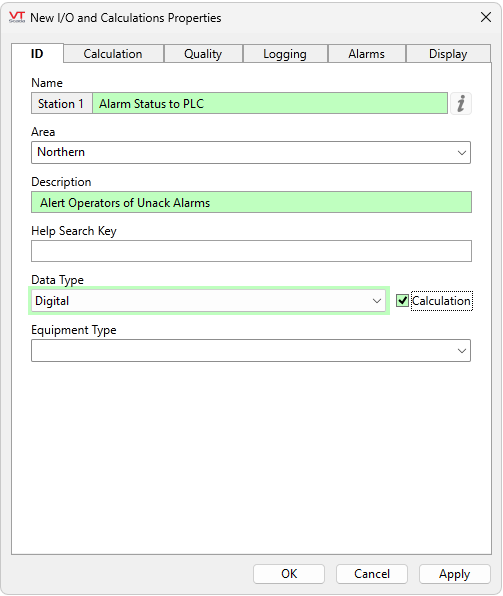
Create an I/O & Calculation tag.
-
Set the Data Type to "Digital"
-
Check the "Calculation" check box.
-
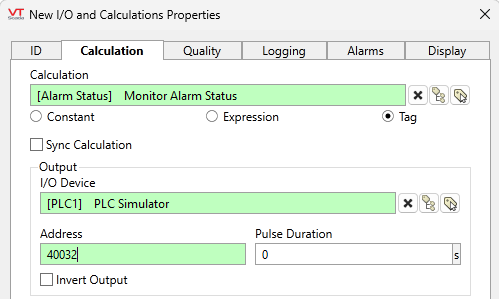
In the Calculation tab, set the Calculation field to "tag" mode and select the Alarm Status tag.
-
Set the I/O Device and address appropriately to write to your PLC.
-
The Alarm Status tag's value will become TRUE when there are unacknowledged alarms that meet the set filter criteria, and FALSE when there are not.
