Setup Recommendations Dialog
The Setup Recommendations dialog summarizes key performance and security best practices and provides hyperlinks for further reading. The dialog is a pop-up that appears when the VTScada Application Manager (VAM) starts. Any recommendations corresponding to a VTScada update will first appear highlighted in a bold, dark blue text above older updates listed in plain text. After the initial display, the recommendations will appear in normal text consistent with older updates, or recommendations when VTScada is first installed.
When does the Setup Recommendation dialog appear?
- The Setup Recommendations dialog will appear after the first installation and every time the recommendations have been updated, following the VAM appearing on start up.
- The appearance of the VAM is the trigger. If the VAM does not make an appearance due to the configuration of your application, the dialog will not appear.
- When VTScada is updated, the dialog will appear once with Setup Recommendations corresponding to the new version. It will not pop up again after 'close' is selected.
Setup Recommendations will change over time. Changes to older recommendations will appear with VTScada updates, as bold blue text upon the first viewing as a notification. When VTScada is updated and the dialog begins to appear again, it is a best practice to review the recommendations for changes before closing it again.
About the Hyper-linked Resources
The Security Guidelines Manual is separate from the rest of the Help documentation and can be found in the Documents sub-folder of your installation folder. (C:\VTScada\Documents\VTScada_Security_Guidelines_Manual.html). You do not need an internet connection for the hyperlink to work.
There is a little flexibility for the Optimization Guide. The hyperlink will direct you to the documentation page contained in your installation folder (C:\VTScada\VTSHelp...). This page is as up-to-date as your current version of VTScada. If you have opted out of downloading the local VTSHelp files, the hyperlink will redirect you to the online URL. This page is kept up-to-date with every new version of VTScada.
If you do not have an internet connection and you have opted out of installing the VTSHelp files, you may want to use a separate internet-connected device to check out the Optimization Guide here:
Reopen the dialog from the VTScada Application Manager (VAM)
This is especially useful if you want to see the dialog without restarting the VAM or if you have checked "Don't show this again".
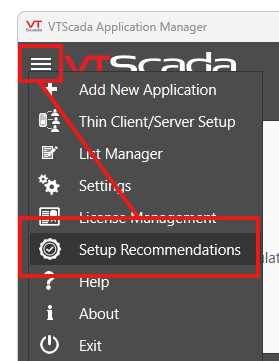
Click on the hamburger button on the top-left of the VAM and look for "Setup Recommendations".