UDP Connections
VTScada uses Windows Socket Library (Winsock) to manage the UDP connections and sockets. There are three port numbers specified for a UDP connection:
- Remote Port: The port number of the host address.
VTScada will send the datagram to this port number on the host device. In most cases, the reply from the host is initiated on this same port. Datagrams from other ports will be dropped, unless the connection is configured to allow them from any UDP ports. - Inbound Port: The listener port on which this connection receives one-way inbound datagrams.
In VTScada, all UDP connections using the same inbound port number will share the same listener. When a datagram is received, the listener will find the exact UDP connection based on the remote address and port number. To prevent duplicate matches, if two UDP connections use the same remote IP address and port number, VTScada will fail to create the second one and return an error code (10048). - Transmit Port: The port number from which the connection transmits the datagram.
Based on the Winsock design, the socket will also receive the datagrams on the same port number. Therefore, this connection channel is a bi-directional one. If the port number is not configured or 0, Winsock will assign a port number for the socket (from 49152 to 65535) automatically.
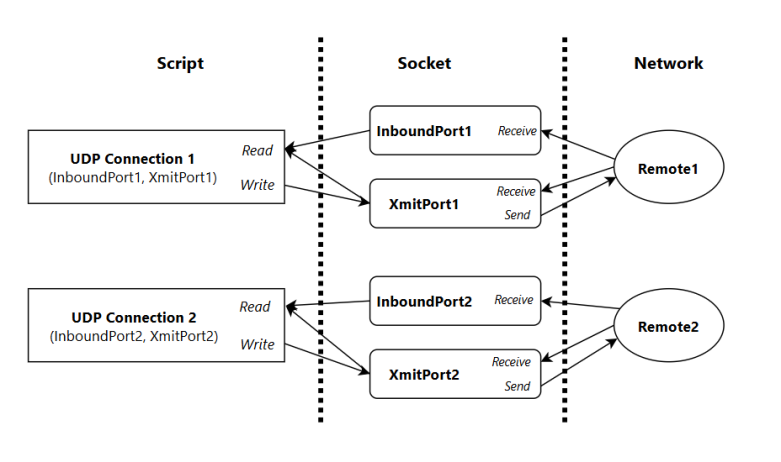
The remote port is at the networked device, Inbound port receives and is read-only. Transmit (Xmit) port reads and writes.
Before VTScada 12.3, the UDP/IP Port tags typical shared one port number that was used for both inbound and transmit datagrams and UDP connections. This is the simplest method and it works for the most common UDP unicast communication.
In very large applications, or for some specific driver protocols, or for some high-volume, high-frequency uses, this begins to have a performance impact. The Transmit Port setting and alternative configuration recommendations have been added to VTScada's UDP/IP Port tag for UDP traffic control and to manage performance impact.
Troubleshooting of UDP Connections
VTScada experienced high processing loads for broadcast messages on a port used by many UDP connections
When packets are broadcast packets (not unicast), all sockets on the port will be triggered. Only the inbound socket will start processing the packet and find the correct UDP connection, however, all bi-directional sockets still take up resources.
The solution is to change the "Transmit Port Number" of the UDP port tags to 0. This will automatically assign an alternative ephemeral port number and the bi-directional sockets will stop receiving inbound datagrams.
Packets are being delivered to the wrong connection with a shared Transmit Port Number
If the wrong connection has no inbound port, the bi-directional socket cannot pass it to the shared inbound port to find the correct one.
Change the Transmit Port Number to another number or specify the Inbound Port Number (For example, any unused port number between 20000 and 40000)
UDP and TCP/IP Error Codes
A valid TCP/IP (and UDP/IP) port tag can have any of the following values.
Error codes from the underlying operating system may be passed through. For codes not listed here, refer to https://learn.microsoft.com/en-us/windows/win32/debug/system-error-codes--9000-11999-
| Error code (Decimal) |
Error code (Hex) |
Meaning |
|---|---|---|
| 00 | 0x0 | No Error |
| 259 | 0x103 | Port did not connect |
| 260 | 0x104 | Connection was lost |
| -802 | Neither the Common Name (CN) or Subject Alternative Names (SAN) used in the X.509 certificate match the target device name. | |
| -803 | There is no Local Security Authority (LSA) context for the operation | |
| -804 | The clocks on the client and server machines are too far skewed. | |
| -10048 | Only one usage of each socket address (protocol/network address/port) is normally permitted. | |
| -10051 | Port unreachable | |
| -10053 | Connection aborted | |
| -10054 | Connection reset | |
| -10060 | Connection timeout | |
| -10061 | Connection refused | |
| -10065 | Host unreachable |
See also: Client Socket Error Codes
