
VTScada OPC UA Server follows the redundancy model of VTScada. The OPC UA Server tag has a unique set of service management requirements, so this tag manages itself. There is no need to configure a server list for the service through application configuration and attempting to do so will have no effect. To have OPC UA Server Redundancy, you need at least two machines running the application and then you must configure all controlling workstations in the OPC UA Server tag.
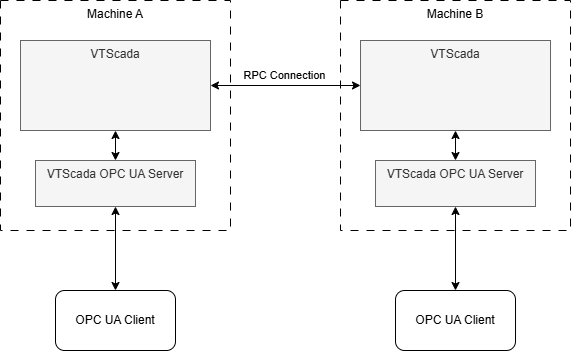
An RPC Connection will automatically share trusted/untrusted client certificates between machines and effectively provide failover support
Client certificates must be trusted manually, but only need to be trusted on one machine. The Trust/Untrust state of a client certificate is replicated across all controlling workstations configured in the OPC UA Server tag.
Quick Connect Guide - Redundancy
This is a summary that includes the minimal steps you could take to establish a redundant OPC UA Server between two machines. In this scenario, Machine A is running an application with a configured OPC UA Server. Add Machine B to Machine A's common server list, On Machine B, install the configured application by using Get From Workstation. On either machine, navigate to the properties dialog of the OPC UA Server tag. In the Server tag, Add Machine B as a second Controlling Workstation.
The OPC UA Server tag Server tab fields are all applicable to the controlling workstation selected in the droplist. Here are the steps in more detail:
- On Machine A, add Machine B to your common server list.
- On Machine B, add a new application using the advanced wizard. Use Get From Workstation to get the application from Machine A.
- In either machine, find the OPC UA Server tag in the tag browser, right-click, select "Properties" and click the "Server" tab.
- Click the [ + ] to add a new Controlling Workstation named after Machine B.
- With Machine B as the Controlling Workstation, the rest of the fields should go blank. If you select Machine A from the Controlling Workstation droplist, the fields should appear populated.
- With Machine B as the Controlling Workstation, configure the fields. Machine B must have a unique Endpoint and it's own Certificate. Technically, you are configuring the VTScada OPC UA Server process that runs on Machine B, but they are both operating from the same shared application over an RPC Connection and therefore mirror the information for OPC UA Clients.
That's it. As tag data and alarms are distributed across the VTScada distributed system, so the local OPC UA Servers have their tag values updated by the local VTScada system. Trust/Untrusted client certificates will be shared between machines.
No automatic failover is provided for OPC UA Clients. It is up to the OPC UA Client to fail over to a redundant OPC UA Server should the need arise.
