(Dialog Library)
| Description: |
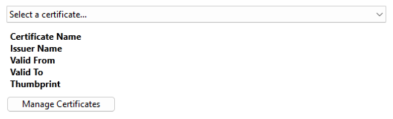
Parameter setting Select Certificate tool. This module draws a droplist with a certificate summary section and a 'Manage Certificates' button (see Certificate Management UI). |
| Returns: | Nothing |
Usage:  |
Steady State only. |
| Function Groups: | Graphics |
| Related to: | GUITransform |PAddressEntry |PAlmPriority |PAreaSelect |PCheckBox |PColorEdit |PColorSelect | PContributor | PEditField | PEditName | PFileChooser |PHueSelect| PImageSelect | PIPAddressList | PIPListenerGroup |PMultiCheckBox | PPageSelect | PPhraseEdit | PRadioButtons | PSecBit | PSelectObject | PServerListName | PSpinbox |PTimeZone | PTypeToggle|SiteDispParms |
| Format: |
\DialogLibrary.PSelectCertificate(ParmNum, ID, CertificateEKU, CertificateStore, CertificateType, CallbackScope, CertificateData, ReturnThumbprint, AdditionalSAN, DefaultCertName) |
| Parameters: |
| ParmNum |
| Required. Any numeric expression giving the parameter number (from 0) in the caller to alter. |
| ID |
| Required. Focus ID of the PTool. |
| CertificateEKU |
| Required. Extended Key Usage OID ('Object ID') of the certificates. |
| CertificateStore |
| Required. Name of the Certificate Store to use. |
| CertificateType |
| An optional parameter flag. 1 = 'Self Signed certificate', 2 = 'CA Signed certificate,' Defaults to 1 (Self signed certificates). |
| CallbackScope |
|
An optional callback scope which must strictly use the module names listed below. All callback modules are invoked with the parameters provided in the following list. All the callbacks below shall be subroutines.
|
| CertificateData |
| Optional. Provides an array of certificates. This can be used if the user doesn’t want to retrieve certificates from the certificate store but instead wants to supply their own. |
| ReturnThumprint |
| An optional parameter flag. Boolean. If TRUE, the parameter would be set to hex thumbprint. If FALSE, the parameter would be set to Certificate name. Defaults to FALSE. |
| AdditionalSAN |
| An optional parameter that is an array of additional SAN entries. |
| DefaultCertName |
| An optional parameter that specifies the default name used when creating a new certificate. |
| Comments: |
This module is a member of the VTScada Dialog Library and must therefore be called from within a GUITransform and prefaced by '\DialogLibrary\'. The 'P tools (PCheckBox, PContributor, PColorSelect, PDroplist, and PEditField) were intended only for use in configuration folders and drawing panel modules, and therefore are subject to the system security restraints. This parameter tool expects the first parameter of its calling module to contain an array of tag parameters. It will then set the element indicated by ParmNum to the text string displayed in the selected line of the droplist. |
Example 1:
GUITransform(70, 210, 210, 170,
	      1, 1, 1, 1, 1,
	      0, 0, 1, 0,
	      0, 0, 0,
	      \DialogLibrary.PSelectCertificate(\#UserCertificateName { Parm num         },
			                        EnableCtrls           { ID               },
			                        EKU                   { Certificate EKU  },
			                        \#CerStore            { CertificateStore },
			                        1                     { CertificateType  }));
Example 2:
GUITransform(70, 210, 210, 170,
	      1, 1, 1, 1, 1,
	      0, 0, 1, 0,
             0, 0, 0,
	      \DialogLibrary.PSelectCertificate(\#UserCertificateName { Parm num         },
			                        EnableCtrls           { ID               },
			                        EKU                   { Certificate EKU  },
			                        \#CerStore            { CertificateStore },
			                        1                     { CertificateType  },
			                        CallbackScope         { CallbackScope    },
			                        CertificateData       { CertificateData  },
			                        FALSE                 { ReturnThumbprint },
		                                AdditionalSAN         { AdditionalSAN    }));
