OPC UA Client Access
Two very common configuration errors are missing privileges and missing the application prefix in the OPC UA Client username.
Access to a secure OPC UA Server by an OPC UA Client requires the client prove its identify to the OPC UA Server. This is achieved by the exchange of X.509 certificates. When a client establishes a connection to the server, the server provides the client with its certificate, allowing the client to verify that this is indeed the server that the client intended to connect to. Similarly, the client provides the server with its certificate, and the server decides whether it trusts the client based on the contents of the certificate.
VTScada provides a user interface in the Client Certificate tab of the OPC UA Server tag to display the client certificates it has received and allow a human to make the decision whether the client should be trusted. Once trusted, it remains trusted until the client certificate expires or a human revokes the client’s access.
User Accounts
In addition to the server trusting the client, the client’s user must provide authentication credentials to enable access to the server data.
Anonymous Access
Anonymous access is access that does not require user authentication (only a trusted Client certificate). VTScada restricts this access to read-only. Anonymous access to published values must be enabled from the Settings tab of the relevant OPC UA Publisher tag.
User Access
Access can also be permitted by username and password. Add a user to your server application and use these credentials to authenticate an OPC UA Client. The VTScada SecurityManager provides three permissions that can be assigned to any VTScada user account to enable access.

The permissions control whether the user account has any access via the OPC UA Server, whether the user account can write VTScada tag values and whether they can call methods, such as a method to acknowledge an alarm.
It is a best practice to create a user account just for OPC UA Client access and to only give this account the minimum required privileges.
When providing the username, you must include the application prefix that was configured in the Settings tab of the OPC UA Publisher tag. If you are using realms, you must also include the realm name.
app-prefix:username is a valid format for an application without realms.
app-prefix:realmname:username is a valid format for an application with realms.
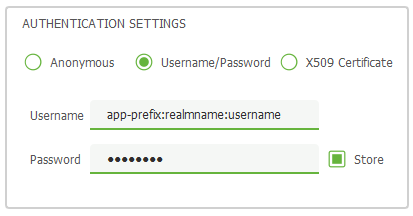
This is what credentials supplied through a 3rd party tool might look like.
