OPC UA Server Configuration
The VTScada OPC UA Server provides services as specified by the OPC Foundation in the OPC 10000 specification at version 1.05: OPC Foundation. This presents a set of VTScada tag values, certain tag properties and alarm data to be accessed by external programs (OPC UA Clients) that maybe running locally or remotely.
The VTScada OPC UA server runs as a separate executable process alongside VTScada, providing security isolation from VTScada itself. All client communication and security is handled by the VTScada OPC UA server thereby providing a higher capacity for clients.
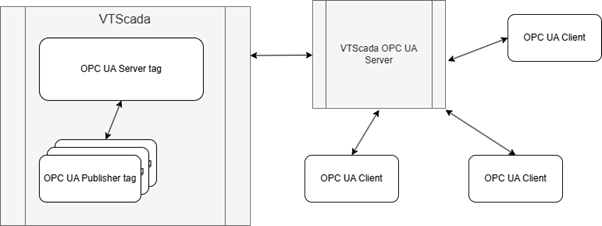
A simplified concept diagram of VTScada's OPC Server
OPC UA Profiles
An OPC UA profile is a defined set of OPC UA features. It defines which services, security options, transport protocols and information models are supported. Profiles allow devices to announce their capability to support OPC UA features.
The VTScada OPC UA Server supports the Standard 2017 UA Server Profile. This is a full-featured profile that defines a minimum set of functionality that is higher than alternative embedded profiles. This profile requires higher limits for Sessions, Subscriptions and Monitored items and support of diagnostic information.
VTScada OPC UA Architecture
A VTScada application configures an OPC UA Server tag that defines the configuration information for the OPC UA Server and provides OPC UA Server certificate management. You can have multiple OPC UA Servers per application and each application running on VTScada can have its own OPC UA Servers or share a common one with other applications.
Each OPC UA Server tag must have one or more OPC UA Publisher tags linked to it. An OPC UA Publisher tag defines a set of parameters for a group of tags that will be published by the OPC UA Server. An application could have more than one publisher tag publishing to the same server if, for example:
- devices are grouped logically to publish to a dedicated namespace or to appear in an alarm event feed.
- you want to configure multiple publisher tags with different levels of client access.
- your application has user realms and you need to limit tag visibility in the OPC UA server by realm.
Each OPC UA Publisher tag has many VTScada IO tags that publish to it. When a tag publishes its data to the Publisher tag, some of the tag configuration and the tag data are published to the OPC UA Server and become available to connected OPC UA Clients.
Hierarchy Representation
An OPC UA Server can present a hierarchy (a tree view) of the tags published to it. The Server hierarchy replicates the VTScada tag hierarchy. Context tags are represented as folders in the OPC UA tree and IO tags as variable nodes.
An OPC UA tree has some nodes defined by the OPC standard. The root of the tree is known as “Root”. Subordinate to that is the “Objects” node. VTScada creates a folder node subordinate to the Objects node to represent your application and presents the published tag hierarchy subordinate to that.
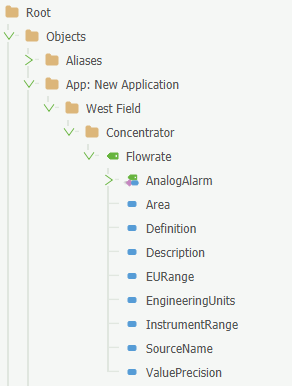
Here is an example of how the hierarchy appears from the VTScada OPC UA Server via a third party OPC UA Client tool.
Some configuration properties of your VTScada IO tags will appear in the tree, subordinate to their IO tag. These include such quantities as the tag’s Engineering Units. If the tag also has alarms configured, an alarm node will be published. An alarm node can be an analog or digital alarm (or both in some cases) and has its own set of properties that define the alarm limits, alarm state and other properties mandated by the OPC UA specification.
An OPC UA Client is typically configured to select a subset of the available nodes and subscribe to them to receive an initial value and subsequently be notified of changes to the value. Consult your OPC UA Client application documentation for details on configuring your OPC UA Clients.
You can permit an OPC UA Client to write a new value to VTScada tags that will accept a value, subject to the user permissions and permissions configured on the Publisher tag.
How VTScada Applications Associate with VTScada OPC UA Server
The conventional approach is that an application would have exactly one OPC UA server that it publishes its tags through. The VTScada OPC UA Server design is not restricted to that.
An application can publish to multiple OPC UA servers. This is done by having multiple OPC UA server tags in the application and binding each Publisher tag to one of the servers. A Publisher tag can only bind to one server at a time so, if a tag should be published to more than one OPC UA server, the tag needs to publish to a PublisherListTag that references an OPC UA Publisher tag for each server.
Multiple applications can also publish to the same OPC UA server. This is achieved by each application having a duplicate OPC UA Server tag and binding their Publisher tags to it. In this case, user-level authentication by OPC UA Clients needs to identify the SecurityManager service instance that will be used to authenticate an OPC UA Client user. The Publisher tags in each application should therefore carry a different application-prefix field value so that client credentials can be checked against the correct application.
Quick Connect Guide - Server Setup
This is a general summary. It is recommended that you review all OPC UA Server documentation before configuring your OPC UA Server. These are the approximate minimal steps you could follow to configure a VTScada OPC UA Server.
See the full OPC UA Server tag and OPC UA Publisher tag reference topics for more details.
- Before configuration, check License Management from the VAM menu to see if your VTScada license enables OPC Server.
- Create an OPC UA Server tag. Give it a Name and optional Area and Description.
- Go to the Server tab.
- Click the [ + ] button to add your machine as a Controlling Workstation.
- The Server Address is fixed at localhost and a Backend Port will autofill.
- Enter a name of your choice in OPC UA Application name.
- Enter a local hard drive location in Configuration Folder (such as C:\VTScada\OPCUA). If the folder doesn't exist, it will auto-generate.
- Fill in the endpoint. it should fit this formula:
opc.tcp://hostname[.myplant.com]:Port[/instance-id]
For example, "opc.tcp://BELLE1.vtscada.com:4880/server"
- The Application URI fits the formula:
urn:hostname[.myplant.com][:optionalstring]
Filling in the Endpoint and Application URI here will help with the certificate process by auto-populating the DNS and URL entries in the SAN. You may opt to manually configure the entries in the SAN. The Application URI field will ultimately change to match the selected certificate.
- Select at least one Communication Security Mode. Best Practice: Sign and Encrypt.
- If you have enabled Sign or Sign and Encrypt, Select at least one Communication Security Protocol.
- Click "Manage Certificates" and "Create New"
- Certificate Name and Certificate Subject will auto fill.
- You must add a DNS and URL to the Subject Alternative Names (SAN) field. It should fit this formula:
DNS=hostname[.myplant.com]
URL=urn:hostname[.myplant.com][:optionalstring]
For example,
"DNS=BELLE1.vtscada.com
URL=urn:BELLE1.vtscada.com:OPCUA_Server"
Once it is configured, the Certificate's "Valid" column should say "Yes".
- Close the Manage Certificates Dialog and select the certificate from the drop list. The Application URI field will change to match the selected certificate.
- Click OK to save your OPC UA Server tag configuration and close the dialog.
- Create an OPC UA Publisher tag. Give it a Name and optional Area and Description.
- Use the tag selector to link your OPC UA Server tag.
- Your namespace URI must look something like:
http://mydomain.com/name_of_your_choosing
Each OPC UA Publisher tag in the same application should use the same namespace. For example: http://vtscada.com/waterdemo.
- Enter a string of your choose in Application Prefix. For example, "app"
- You may restrict users by realm, or optionally enable anonymous read access, writes, or show alarm event feed.
- Click OK.
At this stage, with a configured OPC UA server tag and OPC UA Publisher tag, your OPC UA server should start.
To publish values to your OPC UA Server, you will need to link an IO tag to the Publisher tag. For testing purposes, this could be a memory tag for manual value changes (read/write) or an analog IO tag with an expression like "Now(1)", which updates once per second with the number of seconds since the start of today (read-only, but constantly moving).
Check the Diagnostics tab of the OPC UA Server tag where you should see populated Server Information and a Certificate Expiry date.
You will have to configure your OPC UA Client to trust the server's certificate. Consult your OPC UA Client documentation for the steps required. Granting or removing Trust from a certificate is synchronized between controlling workstations. See OPC UA Client Access for more information.
